C3P0 连接池连接 seekdb 示例程序
本文将介绍如何使用 C3P0 连接池、MySQL Connector/J 和 seekdb 构建一个应用程序,实现基本的数据库操作,包括创建表、插入、删除、更新和查询数据等。
前提条件
-
您已安装 seekdb。
-
您已安装 JDK 1.8 和 Maven。
-
您已安装 Eclipse。
信息本文档运行代码使用的工具是 Eclipse IDE for Java Developers 2022-03 版本,您也可以根据个人喜好选择适合自己的工具运行的示例代码。
操作步骤
本文中给出的操作步骤是在 Windows 环境下使用 Eclipse IDE for Java Developers 2022-03 编译和运行该项目的步骤。如果您使用的是其他操作系统环境或编译器,那么操作步骤可能会略有不同。
- 将
c3p0-mysql-jdbc项目导入到 Eclipse 中。 - 获取 seekdb URL。
- 修改
c3p0-mysql-jdbc项目中的数据库连接信息。 - 运行
c3p0-mysql-jdbc项目。
步骤一:将 c3p0-mysql-jdbc 项目导入到 Eclipse 中
-
打开 Eclipse,在菜单栏上选择 File -> Open Projects from File System。
-
在弹出的对话框中,点击 Directory 按钮选择项目所在的目录,然后点击 Finish 完成导入。
信息当使用 Eclipse 导入 Maven 项目时,Eclipse 会自动检测项目中的
pom.xml文件,并根据文件中描述的依赖关系自动下载所需的依赖库,并将它们添加到项目中。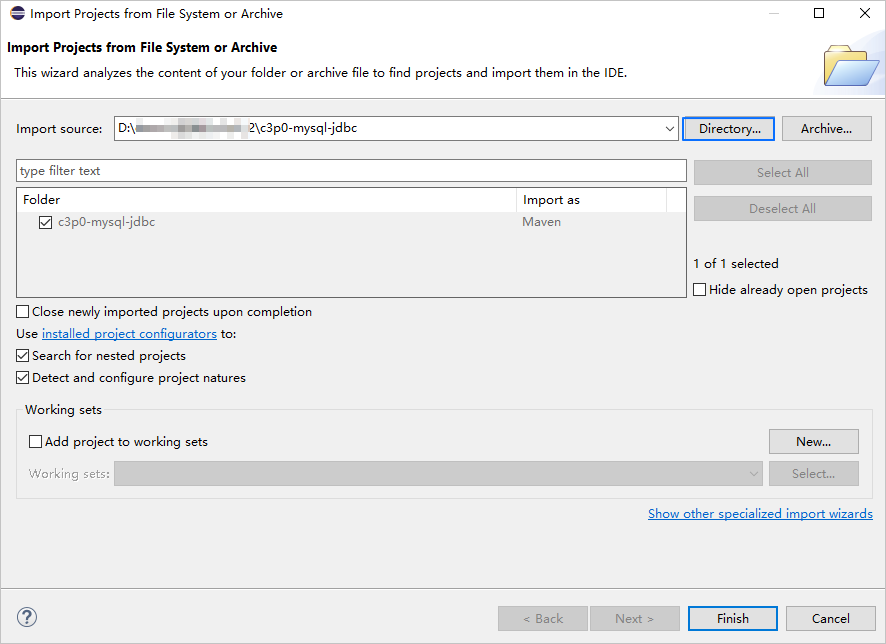
-
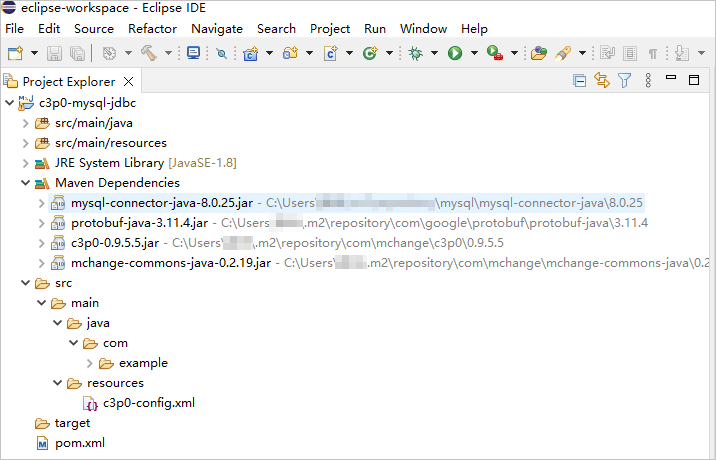
查看项目情况。
步骤二:获取 seekdb URL
-
联系 seekdb 部署人员或者管理员获取相应的数据库连接串。
示例如下:
mysql -hxxx.xxx.xxx.xxx -P2881 -uroot -p****** -Dtest更多连接串的信息,请参见 通过 MySQL 连接 seekdb。
-
根据 seekdb 连接串信息填写下面 URL 的对应信息。
jdbc:mysql://$host:$port/$database_name?user=$user_name&password=$password参数说明:
$host:提供 seekdb 的连接 IP。应该被实际的 IP 替换,也可以使用本地 IP 及 127.0.0.1。$port:提供 seekdb 接端口。应该被实际的端口替换,默认是 2881,在部署 seekdb 时可自定义。$database_name:需要访问的数据库名称。$user_name:提供连接账户。格式:用户名。$password:提供账户密码。
更多有关 MySQL Connector/J 连接属性信息,请参见 Configuration Properties。
示例如下:
jdbc:mysql://xxx.xxx.xxx.xxx:2881/test?user=root&password=******
步骤三:修改 c3p0-mysql-jdbc 项目中的数据库连接信息
根据 步骤二:获取 seekdb URL 中获取的信息修改文件 c3p0-mysql-jdbc/src/main/resources/c3p0-config.xml 中的数据库连接信息。
示例如下:
- seekdb 的 IP 地址为
xxx.xxx.xxx.xxx。 - 访问端口使用的是 2881。
- 需要访问的数据库名称为
test。 - 连接账户是
root。 - 密码是
******。
代码如下:
...
        <property name="jdbcUrl">jdbc:mysql://xxx.xxx.xxx.xxx:2881/test</property>
        <property name="user">root</property>
        <property name="password">******</property>
...
步骤四:运行 c3p0-mysql-jdbc 项目
-
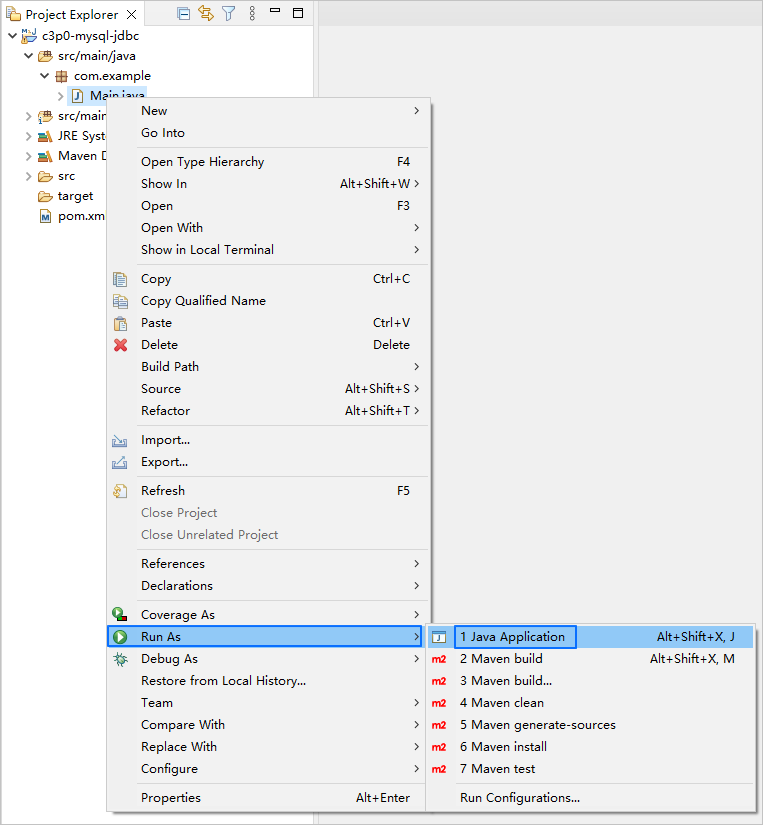
在项目导航器视图中,找到并展开 src/main/java 目录。
-
右键点击 Main.java 文件,然后选择 Run As -> Java Application。
-
在 Eclipse 的控制台窗口中来查看项目的日志信息和输出结果。

-
也可以在 seekdb 中执行以下 SQL 语句查看结果。
SELECT * FROM test_c3p0;返回结果如下:
+------+--------------+
| id   | name         |
+------+--------------+
|    5 | test_update  |
|    6 | test_insert6 |
|    7 | test_insert7 |
|    8 | test_insert8 |
|    9 | test_insert9 |
+------+--------------+
5 rows in set
项目代码介绍
点击 c3p0-mysql-jdbc 下载项目代码,是一个名称为 c3p0-mysql-jdbc.zip 的压缩包。
解压后,得到一个名为 c3p0-mysql-jdbc 的文件夹。目录结构如下所示:
c3p0-mysql-jdbc
├── src
│   └── main
│       ├── java
│       │   └── com
│       │        └── example
│       │           └── Main.java
│       └── resources
│           └── c3p0-config.xml
└── pom.xml
文件说明:
src:源代码根目录。main:主代码目录,包含应用程序的主要逻辑。java:Java 源代码目录。com:Java 包目录。example:示例项目的包目录。Main.java:主类,包含创建表和插入数据等逻辑。resources:资源文件目录,包含配置文件等。c3p0-config.xml:C3P0 连接池的配置文件。pom.xml:Maven 项目的配置文件,用于管理项目的依赖和构建设置。
pom.xml 代码介绍
pom.xml 文件是 Maven 项目的配置文件,定义了项目的依赖项、插件和构建规则等信息。Maven 是一个 Java 项目管理工具,可以自动下载依赖项、编译和打包项目等操作。
本文 pom.xml 文件的代码主要包括以下几个部分:
-
文件声明语句。
声明本文件是一个 XML 文件,使用的 XML 版本是
1.0,字符编码方式是UTF-8。代码如下:
<?xml version="1.0" encoding="UTF-8"?> -
配置 POM 的命名空间和 POM 模型版本。
- 通过
xmlns指定 POM 的命名空间为http://maven.apache.org/POM/4.0.0。 - 通过
xmlns:xsi指定 XML 命名空间http://www.w3.org/2001/XMLSchema-instance。 - 通过
xsi:schemaLocation指定 POM 的命名空间为http://maven.apache.org/POM/4.0.0和 POM 的 XSD 文件的位置为http://maven.apache.org/xsd/maven-4.0.0.xsd。 - 通过
<modelVersion>元素指定了该 POM 文件使用的 POM 模型版本为4.0.0。
代码如下:
<project xmlns="http://maven.apache.org/POM/4.0.0"
         xmlns:xsi="http://www.w3.org/2001/XMLSchema-instance"
         xsi:schemaLocation="http://maven.apache.org/POM/4.0.0 http://maven.apache.org/xsd/maven-4.0.0.xsd">
  <modelVersion>4.0.0</modelVersion>

 <!-- 其他配置 -->

</project> - 通过
-
配置基本信息。
- 通过
<groupId>指定项目所属组织为com.example。 - 通过
<artifactId>指定项目的名称为testc3p0。 - 通过
<version>项目的版本号为1.0-SNAPSHOT。
代码如下:
    <groupId>com.example</groupId>
    <artifactId>testc3p0</artifactId>
<version>1.0-SNAPSHOT</version> - 通过
-
配置项目源文件的属性。
指定 Maven 的编译器插件为
maven-compiler-plugin,并设置了源代码和目标 Java 版本都为 8。这意味着项目的源代码使用 Java 8 特性编写,且编译后的字节码也将兼容 Java 8 运行时环境。这样设置可以确保项目在编译和运行时能够正确地处理 Java 8 的语法和特性。信息Java 1.8 和 Java 8 是同一个版本的不同命名方式。
代码如下:
    <build>
        <plugins>
            <plugin>
                <groupId>org.apache.maven.plugins</groupId>
                <artifactId>maven-compiler-plugin</artifactId>
                <configuration>
                    <source>8</source>
                    <target>8</target>
                </configuration>
            </plugin>
        </plugins>
</build> -
配置项目所依赖组件。
信息本部分代码定义项目所依赖组件是 MySQL Connector/J 的 8.0.25 版本,如果需要了解其他版本的信息,请参见 MySQL Connector/J。
通过
<dependency>定义依赖项:- 添加
mysql-connector-java依赖库:
- 通过
<groupId>指定依赖项所属的组织为mysql。 - 通过
<artifactId>指定依赖项的名称为mysql-connector-java。 - 通过
<version>指定依赖项的版本号为8.0.25。
- 添加
c3p0依赖库:
- 通过
<groupId>指定依赖项所属的组织为com.mchange。 - 通过
<artifactId>指定依赖项的名称为c3p0。 - 通过
<version>指定依赖项的版本号为0.9.5.5。
代码如下:
    <dependencies>
        <dependency>
            <groupId>mysql</groupId>
            <artifactId>mysql-connector-java</artifactId>
            <version>8.0.25</version>
        </dependency>
        <dependency>
            <groupId>com.mchange</groupId>
            <artifactId>c3p0</artifactId>
            <version>0.9.5.5</version>
        </dependency>
</dependencies> - 添加
c3p0-config.xml 代码介绍
c3p0-config.xml 文件是 C3P0 连接池配置文件,用于配置与数据库的连接相关的属性。通过设置各个 <property> 元素的值,可以配置数据库驱动、连接 URL、用户名、密码、连接池大小等属性。
本文 c3p0-config.xml 文件的代码主要包括以下几个部分:
-
文件声明语句。
声明本文件是一个 XML 文件,使用的 XML 版本是
1.0,字符编码方式是UTF-8。代码如下:
<?xml version="1.0" encoding="UTF-8"?> -
配置基本信息。
- 通过
<c3p0-config>包含 c3p0 连接池的配置信息。 - 通过
<named-config name="seekdb">定义了一个具名配置,名称为seekdb。在代码中,可以使用这个名称来引用该具名配置,并获取与seekdb数据库相关的连接信息和连接池属性。
代码如下:
<c3p0-config>
    <named-config name="seekdb">

        // 配置各个 <property> 元素的值

    </named-config>
</c3p0-config> - 通过
-
配置数据库驱动。
通过
<property>用于指定连接 seekdb 时使用的 MySQL JDBC 驱动程序的类名为com.mysql.cj.jdbc.Driver。信息有关 MySQL Connector/J 实现类的名称信息,请参见 Driver/Datasource Class Name。
代码如下:
<property name="driverClass">com.mysql.cj.jdbc.Driver</property> -
配置数据库连接信息。
- 设置数据库连接的 URL,包括主机 IP、端口号、需要访问的数据库和 URL 参数等信息。
- 配置数据库用户名。
- 配置数据库密码。
代码如下:
        <property name="jdbcUrl">jdbc:mysql://$host:$port/$database_name</property>
        <property name="user">$user_name</property>
        <property name="password">$password</property>
参数解释:
$host:提供 seekdb 连接 IP。应该被实际的 IP 替换,也可以使用本地 IP 及 127.0.0.1。$port:提供 seekdb 连接端口。应该被实际的端口替换,默认是 2881,在部署 seekdb 时可自定义。$database_name:需要访问的数据库名称。$user_name:提供连接账户。格式:用户名。$password:提供账户密码。
-
配置其他 c3p0 数据库连接池的配置项。
- 设置连接池在需要时一次性增加的连接数为 20。即在连接池中的连接不足时,每次增加连接的数量为 20。
- 设置连接池的初始大小为 10。即连接池在启动时会预先创建 10 个连接。
- 设置连接池的最小连接数为 5。即连接池中保持的最少连接数量不低于 5。
- 设置连接池的最大连接数为 30。即连接池中允许的最大连接数量不超过 30。
- 设置每个连接的最大缓存语句数量为 0。即不缓存语句。
- 设置每个连接在连接池中的最大缓存语句数量为 0。即每个连接不缓存语句。
- 设置 c3p0 使用的辅助线程数量为 3。这些辅助线程用于执行慢速 JDBC 操作。
- 设置 c3p0 连接的属性检查周期为 3 秒。即每隔 3 秒检查一次连接的属性。
- 设置获取连接的超时时间为 1000 毫秒。即如果在 1000 毫秒内无法获取到连接,则抛出超时异常。
- 设置连接池中空闲连接的检查周期为 3 秒。即每隔 3 秒检查一次空闲连接的状态。
- 设置连接池中连接的最大空闲时间为 10 秒。即如果连接在 10 秒内没有被使用,则会被关闭。
- 设置连接池中超出最大连接数的连接的最大空闲时间为 5 秒。即如果连接超过最大连接数且处于空闲状态超过 5 秒,则会被关闭。
- 设置尝试获取连接时的重试延迟时间为 1000 毫秒。即如果获取连接失败,将在 1000 毫秒后再次尝试。
- 设置 c3p0 的自动测试表为
Test。这是一个用于测试连接是否有效的特殊表。 - 设置在归还连接到连接池时是否测试连接的有效性。如果设置为 true,则在连接归还到连接池时会进行连接有效性测试。
代码如下:
       <property name="acquireIncrement">20</property>
       <property name="initialPoolSize">10</property>
       <property name="minPoolSize">5</property>
       <property name="maxPoolSize">30</property>
       <property name="maxStatements">0</property>
       <property name="maxStatementsPerConnection">0</property>
       <property name="numHelperThreads">3</property>
       <property name="propertyCycle">3</property>
       <property name="checkoutTimeout">1000</property>
       <property name="idleConnectionTestPeriod">3</property>
       <property name="maxIdleTime">10</property>
       <property name="maxIdleTimeExcessConnections">5</property>
       <property name="acquireRetryDelay">1000</property>
       <property name="automaticTestTable">Test</property>
       <property name="testConnectionOnCheckin">true</property>
具体的属性(参数)配置取决于项目需求和数据库的特点,建议您根据实际情况进行调整和配置。更多 C3P0 连接池配置参数信息,请参见 C3P0。
C3P0 连接池常用配置项:
| 分类 | 属性 | 缺省值 | 描述 |
|---|---|---|---|
| 必选项 | driverClass | N/A | 驱动类名 |
| 必选项 | jdbcUrl | N/A | 用于指定数据库的连接 URL。 |
| 必选项 | user | N/A | 用于指定连接数据库时使用的用户名。 |
| 必选项 | password | N/A | 用于指定连接数据库时使用的密码。 |
| 基本配置 | acquireIncrement | 3 | 用于设置在连接池中需要时一次性获取的连接数。例如,如果 acquireIncrement 的值为 20,而连接池中当前只有 5 个空闲连接,则在获取连接时,连接池会一次性创建 20 个新连接,以满足应用程序的需求。 |
| 基本配置 | acquireRetryAttempts | 30 | 用于设置从数据库获取新连接失败后的重试次数。如果这个值小于或等于零,C3P0 将继续尝试无限地获取一个连接。 |
| 基本配置 | maxIdleTime | 0 | 用于设置连接在连接池中的最大空闲时间,0 表示空闲连接永远不会过期。例如,如果将 maxIdleTime 设置为 10 秒,则连接池中的连接在空闲时间超过 10 秒后,若没有被使用,将被连接池关闭并移除。下次应用程序再次请求连接时,连接池会重新创建一个新的连接。 |
| 基本配置 | maxPoolSize | 15 | 用于设置连接池中的最大连接数。当连接池中的连接数达到 maxPoolSize 指定的值时,新的连接请求将被阻塞,直到有连接被释放回连接池。 |
| 基本配置 | MinPoolSize | 3 | 用于设置连接池中的最小连接数。即使在连接不被使用时,连接池也会保持至少 minPoolSize 指定的数量的连接。 |
| 基本配置 | initialPoolSize | 3 | 用于设置连接池在启动时预先创建的连接数量,取值应在 minPoolSiz 与 maxPoolSize 之间。即在连接池初始化时,会创建 initialPoolSize 指定的数量的连接。 |
| 可选择配置项 | acquireRetryDelay | 1000 | 用于设置在获取连接时的重试延迟时间,单位毫秒。当应用程序从连接池获取连接时,如果连接池中没有可用的连接,可能会发生连接获取失败的情况。此时,连接池会根据 acquireRetryDelay 的配置进行重试。 |
| 可选择配置项 | autoCommitOnClose | false | 用于设置在连接关闭时是否自动提交事务。默认值为 false,即连接在关闭时不会自动提交事务。如果应用程序需要在连接关闭之前显式地提交事务,可以将 autoCommitOnClose 设置为 true。注意:自动提交事务可能会导致数据不一致或丢失的情况。因此,应在确保事务完整性的情况下谨慎使用 autoCommitOnClose。在大多数情况下,建议手动管理事务,确保事务的提交或回滚发生在适当的时机。 |
| 可选择配置项 | automaticTestTable | null | 用于设置连接池的自动测试表。C3P0 将创建一个指定名称的空表,并使用对该表的查询来测试 Connection。默认值为 null,表示不执行任何测试语句。例如,如果将 automaticTestTable 设置为 Test,C3P0 将创建一张名为 Test 的空表,并使用其自带的查询语句进行测试。说明:如果在连接池中同时配置了 automaticTestTable 和 preferredTestQuery,C3P0 会优先使用 preferredTestQuery 来执行测试查询,而忽略 automaticTestTable 的设置。 |
| 可选择配置项 | idleConnectionTestPeriod | 0 | 用于设置连接池执行空闲连接检测的时间间隔,以毫秒为单位。即连接池会每隔一定的时间间隔对空闲连接进行一次测试。默认值是 0,表示不进行空闲连接检测。 |
| 可选择配置项 | maxStatements | 0 | 用于设置连接池的最大预处理语句数量。 说明:如果 maxStatements 和 maxStatementsPerConnection 都为 0,则不会启用语句缓存。如果 maxStatements 为 0,但 maxStatementsPerConnection 为非零值,则会启用语句缓存,但不会强制执行全局限制,只有每个连接的最大限制生效。maxStatements 控制连接池中所有连接的缓存语句的总数。如果设置了 maxStatements,它应该是一个相当大的数量,因为每个连接池中的连接都需要自己独立的、不同的缓存语句集合。 |
| 可选择配置项 | maxStatementsPerConnection | 0 | 用于设置每个连接中允许存在的最大预处理语句数量。 说明:如果 maxStatements 和 maxStatementsPerConnection 都为 0,则不会启用语句缓存。如果 maxStatementsPerConnection 为 0,但 maxStatements 为非零值,则会启用语句缓存,并强制执行全局限制,但对于单个连接不会设置缓存语句的数量限制。 |
| 可选择配置项 | numHelperThreads | 3 | 用于指定用于异步处理任务的辅助线程的数量。 说明:辅助线程的数量越多,可以并行处理的任务就越多,从而提高连接池的处理能力和响应速度。 设置过多的辅助线程可能会导致系统资源的过度消耗,因此应根据系统的硬件配置和性能测试来合理地设置 numHelperThreads 的值。 |
| 可选择配置项 | preferredTestQuery | null | 定义所有连接测试都执行的测试语句。在使用连接测试的情况下可以显著提高测试速度。 注意: |
| 测试的表必须在初始数据源的时候就存在。 | |||
| 可选择配置项 | checkoutTimeout | 0 | 用于指定从连接池中获取连接的超时时间,单位毫秒。默认值为 0,表示没有超时限制。当连接池用完时客户端调用 getConnection() 后等待获取新连接的时间,超时后将抛出 SQLException。 |
| 不建议配置项 | breakAfterAcquireFailure | false | 用于控制当连接获取失败时是否中断连接池的获取操作。获取连接失败将会引起所有等待连接池来获取连接的线程抛出异常。但是数据源仍有效保留,并在下次调用 getConnection() 的时候继续尝试获取连接。如果设置为 true,则在多次获取连接失败后,连接池将不再尝试获取连接,而是快速失败并抛出异常。如果设置为 false,连接池将继续尝试获取连接,直到达到获取连接的超时时间。 |
| 不建议配置项 | testConnectionOnCheckout | false | 用于指定在从连接池中获取连接时是否对连接进行测试。 如果设置为 true,则在获取连接时会执行连接测试。此特性要慎用,会造成至少多一倍的数据库调用。如果设置为 false,则不会执行连接测试。说明:虽然执行连接测试可以确保连接是有效的,但也会增加一定的额外开销。因此,应根据具体的应用需求和性能要求来决定是否启用连接测试。如果应用程序对连接的可用性要求较高,可以启用连接测试。但如果连接池中的连接经常被频繁地获取和释放,可能会导致连接测试过于频繁,从而影响性能。 |
| 不建议配置项 | testConnectionOnCheckin | false | 用于指定在将连接归还到连接池时是否对连接进行测试。 如果设置为 true,则在归还连接到连接池时会执行连接测试。此特性要慎用,同样会造成至少多一倍的数据库调用。如果设置为 false,则不会执行连接测试。说明:尽管执行连接测试可以确保连接是有效的,但这也会增加一定的额外开销。因此,应根据具体的应用需求和性能要求来决定是否启用连接测试。如果应用程序对连接的可用性要求较高,可以启用连接测试。但如果连接池中的连接被频繁地获取和归还,可能会导致连接测试过于频繁,从而影响性能。 |
Main.java 代码介绍
Main.java 文件是示例程序的一部分,用于演示通过 c3p0 连接池获取数据库连接,并在事务中执行一系列数据库操作,包括创建表、插入数据、删除数据、更新数据、查询数据,并将查询结果打印出来。它展示了如何使用 c3p0 连接池来管理数据库连接和执行事务操作,以提高数据库操作的效率和性能。
本文 Main.java 文件的代码主要包括以下几个部分:
-
定义包和导入
java.sql的接口。- 声明当前代码所属的包名为
com.example。 - 导入
java.sql.Connection类,用于表示数据库连接。 - 导入
java.sql.PreparedStatement类,用于执行预编译的数据库操作。 - 导入
java.sql.ResultSet类,用于表示数据库查询结果集。 - 导入
com.mchange.v2.c3p0.ComboPooledDataSource类,用于使用 c3p0 连接池。
代码如下:
package com.example;

import java.sql.Connection;
import java.sql.PreparedStatement;
import java.sql.ResultSet;
import com.mchange.v2.c3p0.ComboPooledDataSource; - 声明当前代码所属的包名为
-
定义类名和方法。
- 定义一个名为
Main的公共类,作为程序的入口点。类名需要与文件名保持一致。 - 定义一个公共静态方法
main,作为程序的起始执行点。 - 使用
try-with-resources语句,获取一个数据库连接和创建预编译的 SQL 语句。 - 数据库事务操作。
- 捕获可能发生的异常并打印异常堆栈信息。
- 定义一个私有静态方法
getConnection,用于获取 c3p0 连接池中的数据库连接。在方法内部,首先创建一个ComboPooledDataSource对象cpds,该对象通过参数oceanbase指定了连接池的配置。然后,通过cpds.getConnection()方法从连接池中获取一个数据库连接,并将其返回。
代码如下:
public class Main {

    public static void main(String[] args) {
        try (
            //获取一个数据库连接
            // 创建预编译的 SQL 语句
            ) {

            // 数据库事务操作:开始事务、创建表、插入数据、删除数据、更新数据、查询数据和提交事务

        } catch (Exception e) {
            e.printStackTrace();
        }
    }

    private static Connection getConnection() throws Exception {
        ComboPooledDataSource cpds = new ComboPooledDataSource("oceanbase");
        return cpds.getConnection();
    }
} - 定义一个名为
-
获取一个数据库连接。
获取一个数据库连接并将其赋值给
conn变量。代码如下:
Connection conn = getConnection(); -
创建预编译 SQL 语句。
- 创建一个用于创建名为
test_c3p0的数据库表的预编译 SQL 语句。 - 创建一个用于向
test_c3p0表插入数据的预编译 SQL 语句。 - 创建一个用于从
test_c3p0表中删除数据的预编译 SQL 语句。 - 创建一个用于更新
test_c3p0表中的数据的预编译 SQL 语句。 - 创建一个用于从
test_c3p0表中查询数据的预编译 SQL 语句。
代码如下:
             PreparedStatement stmtCreate = conn.prepareStatement("CREATE TABLE test_c3p0 (id INT, name VARCHAR(32))");
             PreparedStatement stmtInsert = conn.prepareStatement("INSERT INTO test_c3p0 VALUES (?, ?)");
             PreparedStatement stmtDelete = conn.prepareStatement("DELETE FROM test_c3p0 WHERE id < ?");
             PreparedStatement stmtUpdate = conn.prepareStatement("UPDATE test_c3p0 SET name = ? WHERE id = ?");
PreparedStatement stmtSelect = conn.prepareStatement("SELECT * FROM test_c3p0") - 创建一个用于创建名为
-
开始事务。
设置数据库连接的自动提交为
false,从而启用事务的机制。代码如下:
conn.setAutoCommit(false); -
创建表。
执行创建表的 SQL 语句。
代码如下:
stmtCreate.execute(); -
插入数据。
使用
for循环向test_c3p0表插入 10 条数据,第一列的值是变量i的值,第二列的值是字符串test_insert后面加上变量i的值。代码如下:
            for (int i = 0; i < 10; i++) {
                stmtInsert.setInt(1, i);
                stmtInsert.setString(2, "test_insert" + i);
                stmtInsert.executeUpdate();
} -
删除数据。
设置删除语句的参数为 5 并执行删除操作。
代码如下:
            stmtDelete.setInt(1, 5);
stmtDelete.executeUpdate(); -
更新数据。
设置更新语句的第一个参数是
test_update,第二个参数是 5 并执行更新操作。代码如下:
            stmtUpdate.setString(1, "test_update");
            stmtUpdate.setInt(2, 5);
stmtUpdate.executeUpdate(); -
查询数据。
- 执行查询语句,并将查询结果保存在
ResultSet对象rs中。 - 使用 while 循环,通过 rs.next() 判断结果集中是否还有下一行数据。如果有,则执行循环内的代码。
- 循环内的代码打印每一行数据的
id列和name列的值。 - 关闭结果集,释放相关资源。
代码如下:
            ResultSet rs = stmtSelect.executeQuery();
            while (rs.next()) {
                System.out.println(rs.getInt("id") + "   " + rs.getString("name"));
            }
rs.close(); - 执行查询语句,并将查询结果保存在
-
提交事务。
代码如下:
conn.commit();
完整的代码展示
pom.xml
<?xml version="1.0" encoding="UTF-8"?>
<project xmlns="http://maven.apache.org/POM/4.0.0"
         xmlns:xsi="http://www.w3.org/2001/XMLSchema-instance"
         xsi:schemaLocation="http://maven.apache.org/POM/4.0.0 http://maven.apache.org/xsd/maven-4.0.0.xsd">
    <modelVersion>4.0.0</modelVersion>

    <groupId>com.oceanbase</groupId>
    <artifactId>testc3p0</artifactId>
    <version>1.0-SNAPSHOT</version>
    <build>
        <plugins>
            <plugin>
                <groupId>org.apache.maven.plugins</groupId>
                <artifactId>maven-compiler-plugin</artifactId>
                <configuration>
                    <source>8</source>
                    <target>8</target>
                </configuration>
            </plugin>
        </plugins>
    </build>

    <dependencies>
        <dependency>
            <groupId>mysql</groupId>
            <artifactId>mysql-connector-java</artifactId>
            <version>8.0.25</version>
        </dependency>
        <dependency>
            <groupId>com.mchange</groupId>
            <artifactId>c3p0</artifactId>
            <version>0.9.5.5</version>
        </dependency>
    </dependencies>
</project>
c3p0-config.xml
<?xml version="1.0" encoding="UTF-8"?>
<c3p0-config>
    <named-config name="seekdb">
        <!-- Configure Database Driver -->
        <property name="driverClass">com.mysql.cj.jdbc.Driver</property>
        <!-- Configure Database Link Address -->
        <property name="jdbcUrl">jdbc:mysql://$host:$port/$database_name</property>
        <!-- Configure database username -->
        <property name="user">$user_name</property>
        <!-- Configure database password -->
        <property name="password">$password</property>
        <!-- How many connection objects does the database Connection pool want from the database at one time -->
        <property name="acquireIncrement">20</property>
        <!-- Initialize connections -->
        <property name="initialPoolSize">10</property>
        <!-- Minimum number of connections -->
        <property name="minPoolSize">5</property>
        <!-- The maximum number of connections reserved in the Connection pool. Default: 15 -->
        <property name="maxPoolSize">30</property>
        <!-- JDBC standard parameter used to control the number of PreparedStatements loaded within the data source. However, the pre cached statements belong to a single connection rather than the entire Connection pool. So setting this parameter requires considering multiple factors. If both maxStatements and maxStatementsPerConnection are 0, the cache is turned off. Default:0 -->
        <property name="maxStatements">0</property>
        <!-- MaxStatementsPerConnection defines the maximum number of cached statements owned by a single connection in the Connection pool. Default: 0 -->
        <property name="maxStatementsPerConnection">0</property>
        <!-- C3p0 is an asynchronous operation, and slow JDBC operations are completed by the helper process. Expanding these operations can effectively improve performance by enabling multiple operations to be executed simultaneously through multithreading. Default:3 -->
        <property name="numHelperThreads">3</property>
        <!-- The user can wait up to 300 seconds before modifying the system configuration parameters. Default: 300 -->
        <property name="propertyCycle">3</property>
        <!-- The default setting for obtaining the connection timeout is to wait for a unit of milliseconds -->
        <property name="checkoutTimeout">1000</property>
        <!-- Check all free connections in the Connection pool every few seconds. Default: 0 -->
        <property name="idleConnectionTestPeriod">3</property>
        <!-- The maximum idle time, within seconds, if not used, the connection will be discarded. If it is 0, it will never be discarded. Default: 0 -->
        <property name="maxIdleTime">10</property>
        <!-- Configure the lifetime of the connection. Connections beyond this time will be automatically disconnected and discarded by the Connection pool. Of course, the connection being used will not be immediately disconnected, but will wait for it to close before disconnecting. When configured to 0, there is no restriction on the lifetime of the connection. -->
        <property name="maxIdleTimeExcessConnections">5</property>
        <!-- The interval time between two connections, in milliseconds. Default: 1000 -->
        <property name="acquireRetryDelay">1000</property>
        <!-- C3p0 will create an empty table called Test and use its built-in query statement for testing. If this parameter is defined, the property preferredTestQuery will be ignored. You cannot perform any operations on this Test table, it will only be used for c3p0 testing. Default: null -->
        <property name="automaticTestTable">Test</property>
        <!-- Test if the connection is valid when obtaining it -->
        <property name="testConnectionOnCheckin">true</property>
    </named-config>
</c3p0-config>
Main.java
package com.example;

import java.sql.Connection;
import java.sql.PreparedStatement;
import java.sql.ResultSet;
import com.mchange.v2.c3p0.ComboPooledDataSource;

public class Main {

    public static void main(String[] args) {
        try (Connection conn = getConnection();

             PreparedStatement stmtCreate = conn.prepareStatement("CREATE TABLE test_c3p0 (id INT, name VARCHAR(32))");
             PreparedStatement stmtInsert = conn.prepareStatement("INSERT INTO test_c3p0 VALUES (?, ?)");
             PreparedStatement stmtDelete = conn.prepareStatement("DELETE FROM test_c3p0 WHERE id < ?");
             PreparedStatement stmtUpdate = conn.prepareStatement("UPDATE test_c3p0 SET name = ? WHERE id = ?");
             PreparedStatement stmtSelect = conn.prepareStatement("SELECT * FROM test_c3p0")) {

            // Begin transaction
            conn.setAutoCommit(false);

            // Create table
            stmtCreate.execute();

            // Insert data
            for (int i = 0; i < 10; i++) {
                stmtInsert.setInt(1, i);
                stmtInsert.setString(2, "test_insert" + i);
                stmtInsert.executeUpdate();
            }

            // Delete data
            stmtDelete.setInt(1, 5);
            stmtDelete.executeUpdate();

            // Update data
            stmtUpdate.setString(1, "test_update");
            stmtUpdate.setInt(2, 5);
            stmtUpdate.executeUpdate();

            // Query data
            ResultSet rs = stmtSelect.executeQuery();
            while (rs.next()) {
                System.out.println(rs.getInt("id") + "   " + rs.getString("name"));
            }
            rs.close();

            // Commit transaction
            conn.commit();

        } catch (Exception e) {
            e.printStackTrace();
        }
    }

    private static Connection getConnection() throws Exception {
        ComboPooledDataSource cpds = new ComboPooledDataSource("oceanbase");
        return cpds.getConnection();
    }
}
相关文档
更多 MySQL Connector/J 的信息,请参见 Overview of MySQL Connector/J。