Build a personalized voice assistant with TEN Framework and OceanBase PowerMem
This tutorial walks you through building a memory-enabled voice assistant agent by integrating OceanBase PowerMem with the TEN Framework. You will see how TEN's real-time multimodal capabilities pair with long-term memory to deliver more personalized, continuous conversations.
For more information about OceanBase PowerMem, see oceanbase/powermem on GitHub.
Why do agents need memory?
Agents need memory because it is the foundation for personalization, continuity, and empathy. Without memory, an agent effectively starts from scratch every time, making it difficult to build trust or deliver efficient, high-quality help.
Maintain the continuity and context of conversations
Problem: If the agent does not remember what the user said before, each conversation will feel disconnected, repetitive, and even frustrating.
Example:
- User: "I've been under a lot of pressure lately, and I'm almost at my breaking point at work."
- A few days later: "Still the same, the project isn't finished yet."
- If the agent remembers the previous conversation, it can say: "You mentioned feeling overwhelmed with the project before. Is it still ongoing? Has it gotten any better?"
- If the agent doesn't have memory, it might ask: "What's been stressing you lately?" — which feels cold and repetitive.
Memory gives conversations a sense of continuity, like being genuinely cared for by a person.
Build emotional connections and trust
The essence of emotional companionship is being "understood" and "remembered." Humans value being remembered in relationships.
Psychological research shows that being remembered in detail (such as preferences, experiences, and emotions) significantly enhances intimacy and trust.
Example:
- "You mentioned you like matcha lattes before. How about we talk about something relaxing today?"
- This kind of detail recall makes the user feel valued, increasing the emotional value.
Memory signals that the user is valued, which strengthens trust and long-term engagement.
Provide personalized services and predict needs
Assistant agents need to actively provide help based on user habits.
Example:
- User: "What's the weather like tomorrow?" every Friday evening.
- An agent with memory can proactively remind: "Friday is coming up. Would you like me to check the weekend weather for you?"
- Or, if the user dislikes having too many meetings, it can suggest: "Next week's schedule is packed. Would you like me to help adjust it?"
Memory upgrades the agent from "passive response" to "proactive care."
Avoid repetitive questions and improve user experience
An agent without memory will repeatedly ask the same questions (e.g., "What's your name?" or "Where do you live?"), which can be annoying.
An agent with long-term memory can:
- Remember the user's name, preferences, and important events (birthdays, anniversaries)
- Express concern at the right time: "Tomorrow is your birthday. How are you planning to celebrate?"
This reduces cognitive load and makes the interaction feel more natural and human.
Support long-term goals and progress tracking
Emotional companions or health assistants often involve long-term goals (such as stress reduction, quitting smoking, or learning).
Memory can be used to:
- Track progress: "You've recorded 3 instances of low mood this week, which is 2 fewer than last week. That's progress!"
- Provide encouragement: "You mentioned you want to keep a diary. Did you write today?"
This positions the agent as an ongoing companion, not a one-off tool.
What we built with OceanBase PowerMem
User memory module
In OceanBase PowerMem v0.2.0, we have introduced the User Memory Module, a key step toward building smarter, more personalized agent assistants. This module automatically analyzes user dialogues, extracting and persisting User Profiles.
User Profile: Describes the user's current state and characteristics, including usage preferences, roles, operational habits, and business needs. It supports dynamic updates and long-term storage, enabling the agent to "remember who you are."
Capabilities and value
With the user memory module, agents evolve from stateless responders to memory-driven assistants, with the following upgrades:
- Context-aware intelligent understanding: Combines historical profiles and behavioral patterns to more accurately identify the user's true intent.
- Personalized recommendations and proactive service: Based on user habits, recommends frequently used commands, optimization suggestions, or high-frequency features.
- Seamless cross-session experience: Preserves context across sessions so users do not have to repeat themselves.
- Foundation for advanced scenarios: Provides the data layer needed for intelligent operations, self-diagnosis, and personalized SQL optimization.
Intelligent memory saving strategy
To ensure performance and consistency, we have designed an efficient coordination mechanism for memory persistence:
| Strategy | Rule | Configurable Parameter |
|---|---|---|
| Based on conversation rounds | Automatically triggers saving after every N rounds of conversation | memory_save_interval_turns (default: 5) |
| Based on idle timeout | Automatically saves after N seconds of inactivity | memory_idle_timeout_seconds (default: 30) |
These two strategies work together, using deduplication checks to avoid redundant writes; they also use a counter synchronization mechanism to prevent race conditions from concurrent updates, ensuring data consistency and system stability.
Personalized greeting generation
To provide a warm "remembered" experience, we introduced the Personalized Welcome Greeting feature when the user first joins, making every interaction more meaningful.
Workflow
- Retrieve memory summary: Retrieve the user's historical conversation summary from PowerMem.
- Generate customized greeting: Fill the memory information into the prompt template and call the LLM to generate 2–3 natural language greetings.
- Multi-language adaptation: Automatically select the corresponding language based on the user's region information (e.g., Chinese, English).
- Speech output: Push the generated greeting to the TTS engine for playback.
Technical Highlights
- Asynchronous non-blocking: The entire process is handled asynchronously, without affecting the user's normal access process.
- 10-second timeout protection: Prevents LLM response delays from affecting the overall experience.
- State isolation mechanism: Uses independent flags to avoid confusion with regular conversations.
- Graceful degradation: Automatically falls back to a generic welcome message when no historical memory is available or if the generation fails, ensuring availability.
Quick start
Prerequisites
-
Sign in to the Agora Console to create a project and obtain the
App IDandPrimary Certificate.tipAgora provides a free quota. If you exceed it, you may be charged. Before proceeding, review Agora's official documentation and pricing, and continue only if you accept the terms.
-
Prepare an API key for an OpenAI-compatible model service.
tipTo obtain an API key for an OpenAI-compatible model service, you will typically need to sign up through a third-party platform. This is subject to that platform's billing rules and may incur charges. Before proceeding, review the official documentation and pricing, and continue only if you accept the terms.
-
Install seekdb in client/server mode. For details, see Deploy seekdb by using yum install.
-
Install Docker. You may need to configure a Docker mirror or proxy to avoid timeouts during image builds.
Deploy the service
-
Clone the TEN Framework repo and create your
.envfile:git clone https://github.com/TEN-framework/ten-framework
cd ten-framework/ai_agents/
cp .env.example .env -
Edit
.env(example: Agora + Qwen). You can also use any OpenAI-compatible model service according to your needs.vim .envUpdate or add the following variables:
# ============================================================= #
# The following variables must be set.
# ============================================================= #

# Agora
# Log in to the Agora Console to create a project and obtain the `App ID` and `Primary Certificate`.
AGORA_APP_ID={To be filled}
AGORA_APP_CERTIFICATE={To be filled}

# LLM (example: Bailian; any OpenAI-compatible provider works)
OPENAI_API_BASE=https://dashscope.aliyuncs.com/compatible-mode/v1
OPENAI_API_KEY={To be filled}
OPENAI_MODEL=qwen3-max

# ============================================================= #
# The following variables must be added.
# ============================================================= #

# Database
DATABASE_PROVIDER=oceanbase
OCEANBASE_HOST=127.0.0.1
OCEANBASE_PORT=2881
OCEANBASE_USER=root
OCEANBASE_PASSWORD=
OCEANBASE_DATABASE=test
OCEANBASE_COLLECTION=memories

# LLM Provider (for PowerMem)
LLM_PROVIDER=qwen
LLM_API_KEY={To be filled}
LLM_MODEL=qwen3-max

# Embedding Provider (for PowerMem)
EMBEDDING_PROVIDER=qwen
EMBEDDING_API_KEY={To be filled}
EMBEDDING_MODEL=text-embedding-v4
EMBEDDING_DIMS=1536 -
Update
property.json:rm -rf agents/examples/voice-assistant-with-PowerMem/tenapp/property.json
vi agents/examples/voice-assistant-with-PowerMem/tenapp/property.jsonPaste the following content:
{
    "ten": {
        "predefined_graphs": [
        {
            "name": "voice_assistant",
            "auto_start": true,
            "graph": {
            "nodes": [
                {
                "type": "extension",
                "name": "agora_rtc",
                "addon": "agora_rtc",
                "extension_group": "default",
                "property": {
                    "app_id": "${env:AGORA_APP_ID}",
                    "app_certificate": "${env:AGORA_APP_CERTIFICATE|}",
                    "channel": "ten_agent_test",
                    "stream_id": 1234,
                    "remote_stream_id": 123,
                    "subscribe_audio": true,
                    "publish_audio": true,
                    "publish_data": true,
                    "enable_agora_asr": false,
                    "agora_asr_vendor_name": "microsoft",
                    "agora_asr_language": "en-US",
                    "agora_asr_vendor_key": "${env:AZURE_STT_KEY|}",
                    "agora_asr_vendor_region": "${env:AZURE_STT_REGION|}",
                    "agora_asr_session_control_file_path": "session_control.conf"
                }
                },
                {
                "type": "extension",
                "name": "stt",
                "addon": "aliyun_asr_bigmodel_python",
                "extension_group": "stt",
                "property": {
                    "params": {
                    "api_key": "${env:OPENAI_API_KEY|}",
                    "language": "zh-CN",
                    "language_hints": [
                        "zh"
                    ]
                    }
                }
                },
                {
                "type": "extension",
                "name": "llm",
                "addon": "openai_llm2_python",
                "extension_group": "chatgpt",
                "property": {
                    "base_url": "${env:OPENAI_API_BASE}",
                    "api_key": "${env:OPENAI_API_KEY}",
                    "frequency_penalty": 0.9,
                    "model": "${env:OPENAI_MODEL}",
                    "max_tokens": 512,
                    "prompt": "",
                    "proxy_url": "${env:OPENAI_PROXY_URL|}",
                    "greeting": "TEN Agent connected. How can I help you today?",
                    "max_memory_length": 10
                }
                },
                {
                "type": "extension",
                "name": "tts",
                "addon": "cosy_tts_python",
                "extension_group": "tts",
                "property": {
                    "params": {
                    "api_key": "${env:OPENAI_API_KEY|}",
                    "model": "cosyvoice-v3-plus",
                    "sample_rate": 16000,
                    "voice": "longanyang"
                    }
                }
                },
                {
                "type": "extension",
                "name": "main_control",
                "addon": "main_python",
                "extension_group": "control",
                "property": {
                    "greeting": "Hello! I'm your AI assistant with memory. I can remember our previous conversations to provide more personalized help.",
                    "agent_id": "voice_assistant_agent",
                    "user_id": "user",
                    "enable_memorization": true,
                    "enable_user_memory": true,
                    "memory_save_interval_turns": 5,
                    "memory_idle_timeout_seconds": 30.0,
                    "powermem_config": {
                    "vector_store": {
                        "provider": "oceanbase",
                        "config": {
                        "collection_name": "${env:OCEANBASE_COLLECTION}",
                        "host": "${env:OCEANBASE_HOST}",
                        "port": "${env:OCEANBASE_PORT}",
                        "user": "${env:OCEANBASE_USER}",
                        "password": "${env:OCEANBASE_PASSWORD}",
                        "db_name": "${env:OCEANBASE_DATABASE}"
                        }
                    },
                    "llm": {
                        "provider": "${env:LLM_PROVIDER}",
                        "config": {
                        "api_key": "${env:LLM_API_KEY}",
                        "model": "${env:LLM_MODEL}"
                        }
                    },
                    "embedder": {
                        "provider": "${env:EMBEDDING_PROVIDER}",
                        "config": {
                        "api_key": "${env:EMBEDDING_API_KEY}",
                        "model": "${env:EMBEDDING_MODEL}",
                        "embedding_dims": "${env:EMBEDDING_DIMS}"
                        }
                    }
                    }
                }
                },
                {
                "type": "extension",
                "name": "message_collector",
                "addon": "message_collector2",
                "extension_group": "transcriber",
                "property": {}
                },
                {
                "type": "extension",
                "name": "weatherapi_tool_python",
                "addon": "weatherapi_tool_python",
                "extension_group": "default",
                "property": {
                    "api_key": "${env:WEATHERAPI_API_KEY|}"
                }
                },
                {
                "type": "extension",
                "name": "streamid_adapter",
                "addon": "streamid_adapter",
                "property": {}
                }
            ],
            "connections": [
                {
                "extension": "main_control",
                "cmd": [
                    {
                    "names": [
                        "on_user_joined",
                        "on_user_left"
                    ],
                    "source": [
                        {
                        "extension": "agora_rtc"
                        }
                    ]
                    },
                    {
                    "names": [
                        "tool_register"
                    ],
                    "source": [
                        {
                        "extension": "weatherapi_tool_python"
                        }
                    ]
                    }
                ],
                "data": [
                    {
                    "name": "asr_result",
                    "source": [
                        {
                        "extension": "stt"
                        }
                    ]
                    }
                ]
                },
                {
                "extension": "agora_rtc",
                "audio_frame": [
                    {
                    "name": "pcm_frame",
                    "dest": [
                        {
                        "extension": "streamid_adapter"
                        }
                    ]
                    },
                    {
                    "name": "pcm_frame",
                    "source": [
                        {
                        "extension": "tts"
                        }
                    ]
                    }
                ],
                "data": [
                    {
                    "name": "data",
                    "source": [
                        {
                        "extension": "message_collector"
                        }
                    ]
                    }
                ]
                },
                {
                "extension": "streamid_adapter",
                "audio_frame": [
                    {
                    "name": "pcm_frame",
                    "dest": [
                        {
                        "extension": "stt"
                        }
                    ]
                    }
                ]
                }
            ]
            }
        }
        ],
        "log": {
        "handlers": [
            {
            "matchers": [
                {
                "level": "info"
                }
            ],
            "formatter": {
                "type": "plain",
                "colored": true
            },
            "emitter": {
                "type": "console",
                "config": {
                "stream": "stdout"
                }
            }
            }
        ]
        }
    }
} -
Build the container image:
# Build the image (if nothing changes, you only need to do this once).
docker build -f agents/examples/voice-assistant-with-PowerMem/Dockerfile -t voice-assistant-with-powermem:latest . -
Start the container:
docker run -it --env-file .env -p 3000:3000 voice-assistant-with-powermem:latest -
Talk to the agent via voice.
Wait for startup to complete, then open
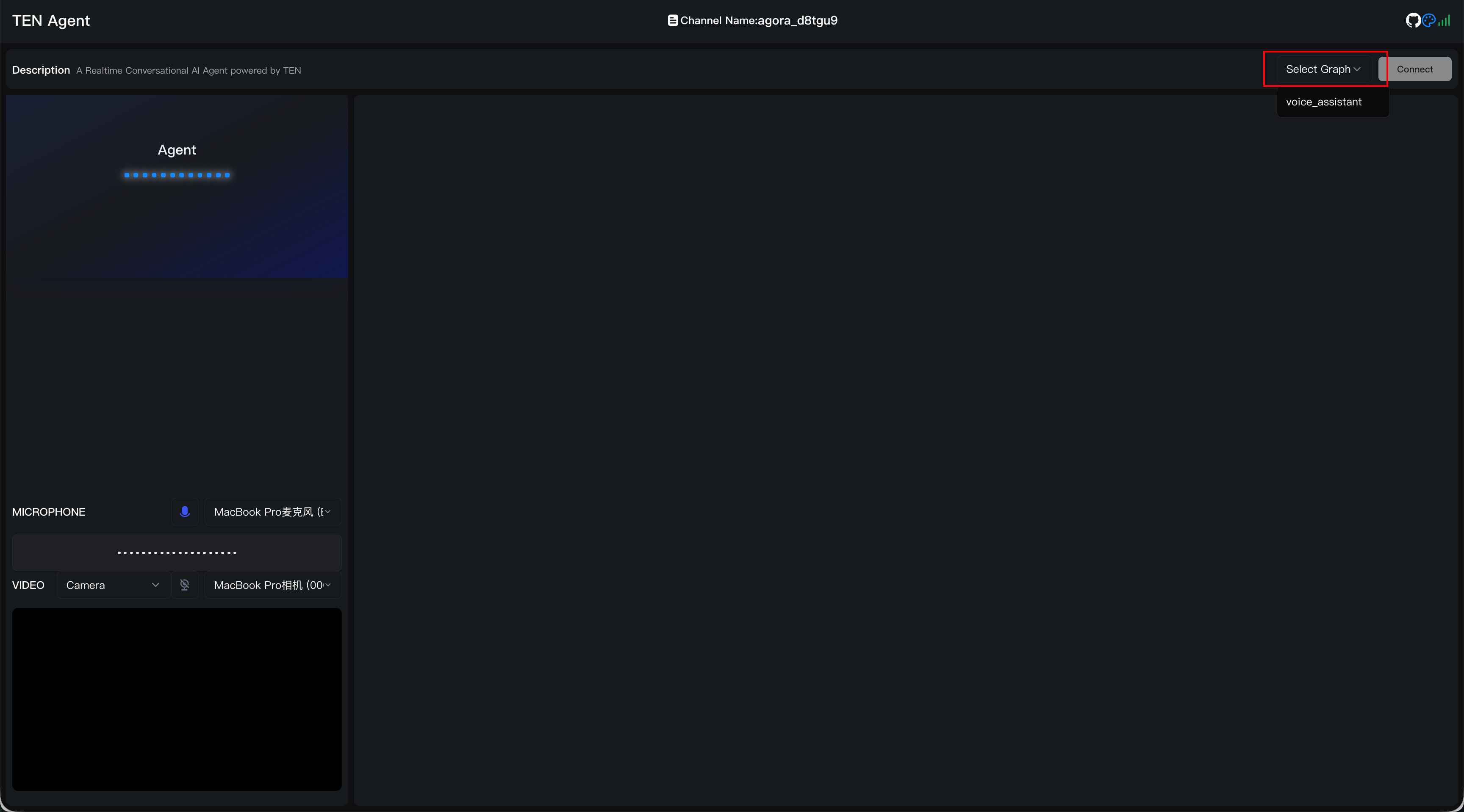
http://127.0.0.1:3000in your browser. If you are running on a remote server, open port 3000 on that host.In the UI, click Select Graph (top right), choose
voice_assistent, then click Connect to start a voice session.tipTo talk to the agent, you must grant microphone permissions in your browser.
Summary
Memory is what turns an AI assistant from a tool into a companion.
It is easy to think of assistants as simple retrieval tools. But truly intelligent agents should not just answer questions. They should learn who you are, maintain context over time, and respond in a way that feels continuous and personal. Memory is the key shift: it turns isolated interactions into experiences with history.
Integrating OceanBase PowerMem into the TEN Framework is an exploration of practical personalization. Instead of optimizing for a "perfect" but cold response machine, we build an agent that can observe behavior, accumulate knowledge, and adapt over time.
That shift is more than an experience upgrade. It is a change in the model:
- From reaction to resonance: Responses become grounded in past interactions, not just the current prompt.
- From generic to personal: The same assistant can feel different to different users because it remembers different things.
- From one-off tasks to long-term companionship: The agent can support ongoing goals, not just a single conversation.
Most importantly, memory creates room for future evolution. Once information can be stored, retrieved, and reasoned over, agents can self-correct, model user preferences, and become proactive. Personalized greetings are just the beginning.
In other words, an agent's value is not just what it knows, it is also what it remembers about you.
This not only reshapes the nature of human-AI relationships, but also sets a new standard for next-generation AI systems: not by how accurate they are, but by whether they are reliable.