Build an application by using the Go-SQL-Driver/MySQL driver and seekdb
This topic describes how to build an application by using the Go-SQL-Driver/MySQL driver and seekdb to perform basic operations such as creating a table, inserting data, and querying data.
Download the go-oceanbase sample project
Prerequisites
Install seekdb, Go, and the relevant drivers, and make sure that the environment variables are properly configured.
- Install seekdb
- Install Go
- Install the Go-SQL-Driver/MySQL driver
Procedure
The following procedure is for Windows. If you are using a different operating system or compiler, the procedure may vary.
- (Optional) Install Go and the driver.
- Obtain the connection information for seekdb.
- Modify the database connection information in the
go-oceanbaseproject. - Run the
go-oceanbaseproject.
Step 1: (Optional) Install Go and the driver
If you have already installed Go and the Go-SQL-Driver/MySQL driver, you can skip this step. If not, follow the steps below.
-
Install Go
-
Download the Go installation package: You can download the installation package suitable for your operating system from the Go official website.
infoThe Go installation package used in this document is go1.20.6.windows-amd64.msi.
-
Install Go: Double-click the downloaded installation package and follow the prompts to install.
-
Configure the environment variables: Add the Go installation path to the system's PATH environment variable.
-
In a Windows environment, you can add the Path value to
C:\usr\local\go\binin Control Panel > System and Security > System > Advanced system settings > Environment Variables > System Variables. -
In a Linux or macOS environment, you can edit the
~/.bashrcor~/.bash_profilefile and add the following content:export PATH=$PATH:/usr/local/go/bin
info\usr\local\go\binis the default installation directory. If you changed the installation directory during Go installation, replace it with the corresponding directory. -
-
Verify the installation: In the Shell command line, enter the following command to check the Go version and verify the installation was successful:
C:\Users\admin\> go version
go version go1.20.6 windows/amd64
-
-
Install the Go-SQL-Driver/MySQL driver
Depending on the Go version, you can choose different installation methods. When installing the Go-SQL-Driver/MySQL driver, you need to navigate to the corresponding project directory and open the command-line terminal. For more information about
Go-SQL-Driver/MySQL, you can refer to Github.The installation command is as follows:
C:\Users\admin\Desktop\go-oceanbase>go get -u github.com/go-sql-driver/mysql
go: downloading github.com/go-sql-driver/mysql v1.7.1
go: added github.com/go-sql-driver/mysql v1.7.1
If you cannot install it using the
go getcommand due to version or network issues, you can use thego installcommand to installgo-sql-driver/mysql.-
Clone the
go-sql-driver/mysqlrepository from GitHub into thego/srcdirectory.cd /usr/local/go/src
git clone https://github.com/go-sql-driver/mysql.gittipReplace
/usr/local/go/srcwith the actual Go installation directory. -
Install it using
go install.go install mysqltipIn some versions, the default execution directory for
go installmay not be/src. You can determine the actual directory based on the error message after runninggo install. For example, if the error message iscannot find package "mysql" in: /usr/local/go/src/vendor/mysql, you should place the mysql folder in the/src/vendordirectory before running the installation command. -
Check whether the Go-SQL-Driver/MySQL driver is installed. If the installation fails, modify it according to the error message.
go list -m github.com/go-sql-driver/mysql
-
Step 2: Obtain the seekdb connection information
Contact the seekdb deployment personnel or administrator to obtain the corresponding database connection string.
mysql -h{host} -u{username} -p****** -P{port} -D{schema_name}
The database connection string contains the parameters required to access the database. You can use the database connection string to verify the login and ensure the connection string parameters are correct.
The URL information is needed in the test.go file.
Parameter description:
host: The IP address for connecting to seekdb. Replace it with the actual IP address. You can also use the local IP address or 127.0.0.1.user_name: The connection account. Format:username.password: The account password.port: The port for connecting to seekdb. Replace it with the actual port. The default port is 2881, which can be customized during seekdb deployment.schema_name: The name of the schema to be accessed.
Step 3: Modify the database connection information in the go-oceanbase project
Based on the information obtained in Step 2: Obtain the seekdb connection information, modify the database connection information in the test.go file. Right-click the test.go file and select Open With to open it using Notepad or another editor.
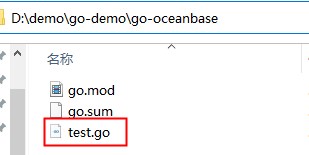
Example:
- The IP address of seekdb is
10.10.10.1. - The access port is 2881.
- The name of the schema to be accessed is
test. - The connection account is
root. - The password is
******.
Sample code:
conn := "root:******@tcp(10.10.10.1:2881)/test"
Step 4: Run the go-oceanbase project
After editing the code, open the command-line terminal in the project directory and run the Go file using the go run command as follows:
C:\Users\admin\Desktop\go-oceanbase>go run test.go
(For Linux or macOS only) You need to configure the temporary environment variables before running go run.
export PATH=$PATH:/usr/local/go/bin
go run test.go
If the following content is returned after running, it indicates that the database connection is successful and the sample statement is executed correctly:
The content is the result after "delete from t1" is executed.
C:\Users\admin\Desktop\go-oceanbase>go run test.go
success to connect OceanBase with go_mysql driver
Hello OceanBase
Project code
Click go-oceanbase to download the project code. It is a compressed package named go-oceanbase.
After decompressing the package, you will find a folder named go-oceanbase. The directory structure is as follows:
|-- go.mod
|-- go.sum
|-- test.go
File description:
go.mod: a Go module file that defines the module dependencies and version information of the project.go.sum: a new module management file added in Go V1.11 and later. It records the module and version information of the project dependencies, as well as the corresponding checksum (Checksum).test.go: a Go source code file that contains the sample code of the project.
Introduction to the go.mod file
The go.mod file is used to define the module name, Go version, and dependency declarations of the project.
The go.mod file contains the following content:
module go-oceanbase: This is the module name of the project, which defines the project's namespace. In Go 1.16 and later, the module name must match the name of the project's root directory.go 1.20: This is the required Go version for the project.require github.com/go-sql-driver/mysql v1.7.1 // indirect: This is the dependency declaration of the project. It specifies that the required version of thegithub.com/go-sql-driver/mysqlmodule is V1.7.1, and that this dependency is an indirect dependency associated with another dependencygo.sum.
Introduction to the go.sum file
The go.sum file is used to define the version information of the github.com/go-sql-driver/mysql dependency to ensure that the correct dependency version is used in the project.
The go.sum file contains the following content:
github.com/go-sql-driver/mysql v1.7.1 h1:lUIinVbN1DY0xBg0eMOzmmtGoHwWBbvnWubQUrtU8EI=The hash value of the source code file of the module, used to ensure that the correct version is used when building the project. Here, the hash value islUIinVbN1DY0xBg0eMOzmmtGoHwWBbvnWubQUrtU8EI=.github.com/go-sql-driver/mysql v1.7.1/go.mod h1:OXbVy3sEdcQ2Doequ6Z5BW6fXNQTmx+9S1MCJN5yJMI=The hash value of the dependency file of the module, used to ensure that the correct dependency version is used when building the project. Here, the hash value isOXbVy3sEdcQ2Doequ6Z5BW6fXNQTmx+9S1MCJN5yJMI=.
Introduction to the test.go file
The test.go file defines how to interact with Go and the MySQL mode of seekdb, including operations such as connecting to the database, creating tables, inserting data, querying data, and deleting tables.
The test.go file contains the following content:
-
Define the
mainpackage.package mainindicates that this is a package for an executable program. This package contains amain()function, which will be executed when the program runs. -
Define the
importpackage.The
importstatement imports the following four packages:database/sql: Provides a general SQL database access interface. It defines a set of generic interfaces and functions for connecting and operating various types of SQL databases.fmt: Provides functions for formatted input and output. It defines a set of functions for formatting data into strings and outputting them to the console or other devices.log: Provides functions for logging. It defines a set of functions for outputting log information to the console or other devices.github.com/go-sql-driver/mysql: Provides the driver for the MySQL mode. It implements the interfaces defined in thedatabase/sqlpackage to enable connection and operation of the MySQL mode in Go. You need to specify the correct installation path ofgo-sql-driver/mysql.
Sample code:
import (
"database/sql"
"fmt"
"log"

_ "github.com/go-sql-driver/mysql"
// Specify the installation path of go-sql-driver/mysql.
) -
Define the
Strstructure. TheStrstructure contains a field namedNamefor storing query results. It also defines amain()function that includes theselectAll()function, which performs operations such as creating tables, inserting data, querying data, and deleting tables.Sample code:
type Str struct {
Name string
}

func main() {
selectAll()
} -
Define the
selectAll()function.The
selectAll()function includes operations such as connecting to the database, creating tables, inserting data, querying data, and deleting tables.-
Connect to the database. Define the connection string
connthat includes the connection parameters for the MySQL mode, such as the username, password, IP address, port number, and database name. Call thesql.Open()function to open the database connection. If an error occurs, log the error and exit the program. Use thedeferkeyword to delay the closure of the database connection to ensure that it is closed when the function ends.Sample code:
conn := "user_name:******@tcp(host:port)/schema_name"
// Database connection parameters

db, err := sql.Open("mysql", conn)
if err != nil {
    log.Fatal(err)
} -
Print a message to the console. Use the
deferkeyword to delay the execution of thedb.Close()function to ensure that the database connection is closed when the function ends. Use thefmt.Printf()function to output a success message to the console.Sample code:
defer db.Close()

if err != nil {
    log.Fatal(err)
}

fmt.Printf("success to connect OceanBase with go_mysql driver\n") -
Create data. Create a table named
t1with a string-type field namedstrof length256.Sample code:
    _, err = db.Query("create table t1(str varchar(256))")
if err != nil {
    log.Fatal(err)
} -
Insert data. Insert a row of data into the
t1table, setting the value of thestrfield toHello seekdb.Sample code:
_, err = db.Query("insert into t1 values ('Hello seekdb')")
if err != nil {
    log.Fatal(err)
} -
Query data. Query all data from the
t1table and assign the query result to the variableres. If the query fails, return the error message.Sample code:
res, err := db.Query("SELECT * FROM t1")
if err != nil {
    log.Fatal(err)
}
defer res.Close()

for res.Next() {
    var str Str
    res.Scan(&str.Name)
    fmt.Printf("%s\n", str.Name)
} -
Delete data. Delete the
t1table. If the deletion fails, return the error message.Sample code:
_, err = db.Query("drop table t1")
if err != nil {
    log.Fatal(err)
}
-
Complete code
tab go.mod
module go-oceanbase
go 1.20
require github.com/go-sql-driver/mysql v1.7.1 // indirect
tab go.sum
github.com/go-sql-driver/mysql v1.7.1 h1:lUIinVbN1DY0xBg0eMOzmmtGoHwWBbvnWubQUrtU8EI=
github.com/go-sql-driver/mysql v1.7.1/go.mod h1:OXbVy3sEdcQ2Doequ6Z5BW6fXNQTmx+9S1MCJN5yJMI=
tab test.go
    package main

    import (
    "database/sql"
    "fmt"
    "log"

    _ "github.com/go-sql-driver/mysql"
    // Specify the installation path of go-sql-driver/mysql.
    )

    type Str struct {
    Name string
    }

    func main() {
    selectAll()
    }

    func selectAll() {
    conn := "user_name:******@tcp(host:port)/schema_name"
    // Database connection parameters

    db, err := sql.Open("mysql", conn)
    if err != nil {
        log.Fatal(err)
    }
    defer db.Close()

    if err != nil {
        log.Fatal(err)
    }

    fmt.Printf("success to connect OceanBase with go_mysql driver\n")
    // Create table t1.
    _, err = db.Query("create table t1(str varchar(256))")
    if err != nil {
        log.Fatal(err)
    }

    // Insert data.
    _, err = db.Query("insert into t1 values ('Hello seekdb')")
    if err != nil {
        log.Fatal(err)
    }

    // Query data.
    res, err := db.Query("SELECT * FROM t1")
    if err != nil {
        log.Fatal(err)
    }
    defer res.Close()

    for res.Next() {
        var str Str
        res.Scan(&str.Name)
        fmt.Printf("%s\n", str.Name)
    }

    // Drop table t1.
    _, err = db.Query("drop table t1")
    if err != nil {
        log.Fatal(err)
    }
    }
References
For more information about Go-SQL-Driver/MySQL, see Go-SQL-Driver/MySQL.