Build an application by using GORM and seekdb
This topic describes how to build an application by using GORM and seekdb to perform basic operations such as creating tables, inserting data, and querying data.
Download the gorm-oceanbase sample project
Prerequisites
Install seekdb, Go, and the relevant drivers, and make sure that the environment variables are correctly configured.
The code in this topic is written using IntelliJ IDEA 2021.3.2 (Community Edition). You can also choose your preferred tool to view the sample code.
- Install seekdb
- Install Go
- Install the Go-SQL-Driver/MySQL driver
Procedure
The following procedure is generated in a Windows environment. If you are using a different operating system or compiler, the procedure may vary.
- (Optional) Install Go and the driver.
- Obtain the connection information for seekdb.
- Modify the database connection information in the
gorm-oceanbaseproject. - Run the
gorm-oceanbaseproject.
Step 1: (Optional) Install Go and the driver
If you have already installed Go and the Go-SQL-Driver/MySQL driver, you can skip this step. If not, follow the steps below.
-
Install Go
-
Download the Go installation package: You can download the installation package for your operating system from the Go official website.
infoThe Go installation package used in this document is named go1.20.6.windows-amd64.msi.
-
Install Go: Double-click the downloaded installation package and follow the prompts to install.
-
Configure the environment variables: Add the Go installation path to the system's PATH environment variable.
-
In a Windows environment, you can add the Path value to
C:\usr\local\go\binin Control Panel > System and Security > System > Advanced System Settings > Environment Variables > System Variables. -
In a Linux or macOS environment, you can edit the
~/.bashrcor~/.bash_profilefile and add the following content:export PATH=$PATH:/usr/local/go/bin
info\usr\local\go\binis the default installation directory. If you changed the installation directory during Go installation, replace it with the corresponding directory. -
-
Verify the installation: In the Shell command line, enter the following command to check the Go version and verify the installation:
C:\Users\admin\> go version
go version go1.20.6 windows/amd64
-
-
Install the Go-SQL-Driver/MySQL driver
Depending on the version of Go, you can choose different installation methods. When installing the Go-SQL-Driver/MySQL driver, you need to navigate to the corresponding project directory and open the command-line terminal. For more information about
Go-SQL-Driver/MySQL, you can refer to Github.The installation command is as follows:
C:\Users\admin\Desktop\go-oceanbase>go get -u github.com/go-sql-driver/mysql
go: downloading github.com/go-sql-driver/mysql v1.7.1
go: added github.com/go-sql-driver/mysql v1.7.1
If you cannot install it using the
go getcommand due to version or network issues, you can use thego installcommand to installgo-sql-driver/mysql.-
Clone the
go-sql-driver/mysqlrepository from GitHub into thego/srcdirectory.cd /usr/local/go/src
git clone https://github.com/go-sql-driver/mysql.gittipReplace
/usr/local/go/srcwith the actual Go installation directory. -
Install it using
go install.go install mysqltipFor some versions, the default execution directory for
go installmay not be/src. You can determine the actual directory based on the error message after runninggo install. For example, if the error message iscannot find package "mysql" in: /usr/local/go/src/vendor/mysql, you should place the mysql folder in the/src/vendordirectory and then run the installation command. -
Check whether the Go-SQL-Driver/MySQL driver is installed. If the installation fails, modify it according to the error message.
go list -m github.com/go-sql-driver/mysql
-
Step 2: Obtain seekdb connection information
Contact the seekdb deployment personnel or administrator to obtain the corresponding database connection information.
mysql -h{host} -u{username} -p****** -P{port} -D{schema_name}
The database connection string contains the parameters required to access the database. You can use the database connection string to verify the login and ensure that the parameters are correct.
The URL information is needed in the test.go file.
Parameter description:
host: the IP address for connecting to seekdb. Replace it with the actual IP address. You can also use the local IP address or 127.0.0.1.user_name: the connection account. Format:username.password: the account password.port: the port for connecting to seekdb. Replace it with the actual port. The default port is 2881, which can be customized during seekdb deployment.schema_name: the name of the schema to be accessed.
Step 3: Modify the database connection information in the gorm-oceanbase project
Based on the information obtained in Step 2: Obtain seekdb connection information, modify the database connection information in the test.go file. Right-click the test.go file and select Open With to open it in Notepad or another editing software.
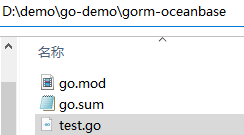
Example:
- The IP address of seekdb is
10.10.10.1. - The access port is 2881.
- The name of the schema to be accessed is
test. - The connection account is
root. - The password is
******.
Sample code:
dsn := "root:******@tcp(10.10.10.1:2881)/test?charset=utf8mb4&parseTime=True&loc=Local"
Step 4: Run the go-oceanbase project
After editing the code, open the command-line terminal in the project directory and run the Go file using the go run command as follows:
PS D:\demo\go-demo\gorm-oceanbase> go run test.go
(Recommended) In Linux or macOS environments, you need to configure temporary environment variables before running go run.
export PATH=$PATH:/usr/local/go/bin
go run test.go
If the following content is returned after the run, it indicates that the database connection is successful and the sample statement is executed correctly:
PS D:\demo\go-demo\gorm-oceanbase> go run test.go
1
<nil>
1
{1 OceanBase 12 2022-06-01 08:00:00 +0800 CST}
<nil>
1
{1 ob 13 2023-06-01 00:00:00 +0000 UTC}
<nil>
1
1
<nil>
1
time="2023-08-09T15:55:46+08:00" level=debug msg=DropTable duration=589.2031ms

2023/08/09 15:55:47 D:/demo/go-demo/gorm-oceanbase/test.go:85 SLOW SQL >= 200ms
[336.194ms] [rows:0] DROP TABLE IF EXISTS `users` CASCADE
Project code
Click gorm-oceanbase to download the project code, which is a compressed package named gorm-oceanbase.
After decompressing it, you will find a folder named gorm-oceanbase. The directory structure is as follows:
|-- go.mod
|-- go.sum
|-- test.go
File description:
go.mod: a Go module file that defines the module dependencies and versions of the project.go.sum: a new module management file introduced in Go V1.11 and later. It records the module dependencies and versions of the project, as well as the corresponding checksums.test.go: a Go source code file that contains the sample code of the project.
go.mod file
The go.mod file is used to define the module name, Go version, and dependency-related declarations for the project.
The go.mod file contains the following content:
-
module gorm-oceanbase: This is the module name, which defines the project's namespace. In Go 1.16 and later, the module name must match the root directory name of the project. -
go 1.20: This specifies the required Go version for the project. -
require: This is a dependency declaration for the project. It lists the third-party libraries and their version information that the project depends on. This dependency is an indirect dependency and is associated with another dependency,go.sum.github.com/go-sql-driver/mysql: The Go-SQL-Driver/MySQL driver, used to connect to and operate on a MySQL database.github.com/jinzhu/inflection: A string conversion library used to convert strings to singular, plural, camel case, etc.github.com/jinzhu/now: A time processing library used to obtain the current time, calculate time differences, and format time.github.com/sirupsen/logrus: A logging library used to record log information during program execution.golang.org/x/sys: A system library that provides system-level operation functions and constants.golang.org/x/text: A text processing library used to handle Unicode strings, format numbers, etc.gorm.io/driver/mysql: The MySQL driver for GORM, used to connect to and operate on a MySQL database in GORM.gorm.io/gorm: The GORM ORM framework, used to simplify database operations.
Sample code:
module gorm-oceanbase

go 1.20

require (
 github.com/go-sql-driver/mysql v1.7.1 // indirect
 github.com/jinzhu/inflection v1.0.0 // indirect
 github.com/jinzhu/now v1.1.5 // indirect
 github.com/sirupsen/logrus v1.9.3 // indirect
 golang.org/x/sys v0.5.0 // indirect
 golang.org/x/text v0.12.0 // indirect
 gorm.io/driver/mysql v1.5.1 // indirect
 gorm.io/gorm v1.25.2 // indirect
)
go.sum file
The go.sum file is used to define dependency information for the project. Each dependency consists of three parts: the library name, version number, and hash value.
The go.sum file contains the following content:
github.com/sirupsen/logrus: A logging library used to record log information during program execution.golang.org/x/text: A text processing library used to handle Unicode strings, format numbers, etc.gorm.io/driver/mysql: The MySQL driver for GORM, used to connect to and operate on a MySQL database in GORM.gorm.io/gorm: The GORM ORM framework, used to simplify database operations.
The dependencies required by the go.sum file vary depending on the runtime environment. Please download the required dependencies based on the execution instructions.
Sample code:
github.com/sirupsen/logrus v1.9.3 h1:dueUQJ1C2q9oE3F7wvmSGAaVtTmUizReu6fjN8uqzbQ=
github.com/sirupsen/logrus v1.9.3/go.mod h1:naHLuLoDiP4jHNo9R0sCBMtWGeIprob74mVsIT4qYEQ=
golang.org/x/text v0.12.0 h1:k+n5B8goJNdU7hSvEtMUz3d1Q6D/XW4COJSJR6fN0mc=
golang.org/x/text v0.12.0/go.mod h1:TvPlkZtksWOMsz7fbANvkp4WM8x/WCo/om8BMLbz+aE=
gorm.io/driver/mysql v1.5.1 h1:WUEH5VF9obL/lTtzjmML/5e6VfFR/788coz2uaVCAZw=
gorm.io/driver/mysql v1.5.1/go.mod h1:Jo3Xu7mMhCyj8dlrb3WoCaRd1FhsVh+yMXb1jUInf5o=
gorm.io/gorm v1.25.2 h1:gs1o6Vsa+oVKG/a9ElL3XgyGfghFfkKA2SInQaCyMho=
gorm.io/gorm v1.25.2/go.mod h1:L4uxeKpfBml98NYqVqwAdmV1a2nBtAec/cf3fpucW/k=
Introduction to test.go
The test.go file defines how to connect to a MySQL database using the Go-SQL-Driver/MySQL driver and perform database operations using the APIs provided by GORM.
The test.go file contains the following content:
-
Define the
mainpackage.package mainindicates that this is a package for an executable program. This package contains amain()function, which will be executed when the program runs. -
Define the
importpackage.The
importstatement imports the following packages:fmt: provides functions for formatted input and output. It defines a set of functions for formatting data into strings and outputting them to the console or other devices.time: provides some functions and types related to time.os: provides some functions and types related to the operating system.gorm.io/driver/mysql: the MySQL database driver for connecting to and operating on a MySQL database.gorm.io/gorm: maps Go language structs to database tables and provides some query and operation methods for the database.golang.org/x/text/transform: provides some basic text processing features, such as character set conversion and Unicode processing.github.com/sirupsen/logrus: provides some features for log output and formatting.
Code:
import (
  "fmt"
  "time"
  "os"
  "gorm.io/driver/mysql"
  "gorm.io/gorm"
  "golang.org/x/text/transform"
  "github.com/sirupsen/logrus"
) -
Define the
Userstruct.Defines a
Userstruct to represent user information, containing four fields:IDfor the user's unique identifier,Namefor the user's name,Agefor the user's age, andBirthdayfor the user's birthday.Code:
type User struct {
ID       int
Name     string
Age      int
Birthday time.Time

} -
Define the
transformStringfunction. Defines atransformStringfunction to convert a string to a specified encoding format. It accepts two parameters:strandencoder. The function usestransform.Stringto convert the string to the specified encoding format. If an error occurs during the conversion, it returns the original string. Finally, it returns the converted string or the original string.Code:
func transformString(str string, encoder transform.Transformer) string {
    result, _, err := transform.String(encoder, str)
    if err != nil {
        return str
    }
    return result
} -
Define the
mainfunction.The
mainfunction performs create, read, update, and delete operations on the created user information and useslogrusto output the corresponding debug logs to the console.-
Initialize
logrus.Initializes the
logruspackage for log output, sets the log output format to text, the log level toDebug, and outputs it to the standard output stream.Code:
logrus.SetFormatter(&logrus.TextFormatter{})
logrus.SetLevel(logrus.DebugLevel)
logrus.SetOutput(os.Stdout) -
Connect to the database.
Defines a string variable named
dsncontaining the information needed to connect to the MySQL database, including username, password, host address, port number, database name, and character set. Calls thegorm.Openfunction to connect to the MySQL database, passing thedsnvariable and agorm.Configparameter, and returns a connection object. If an error occurs during the connection, it outputs the error message and exits the program.Code:
dsn := "user_name:******@tcp(host:port)/schema_name?charset=utf8mb4&parseTime=True&loc=Local"
db, err := gorm.Open(mysql.Open(dsn), &gorm.Config{})
if err != nil {
    fmt.Println(err.Error())
    return
} -
Perform database operations.
Uses the
gorm.DBobject to perform database operations, including automatic migration, inserting data, querying data, updating data, and deleting data. The specific process is as follows:- Calls the
db.AutoMigratefunction to automatically migrate the table corresponding to theUserstruct. If the table does not exist, it creates the table. Uses thedeferkeyword and thedb.Migrator().DropTablefunction to delay the deletion of theuserstable, i.e., delete the table when the program ends. - Creates a
Userstruct instance nameduserand inserts it into the database. - Queries the user with ID 1 and outputs the query result.
- Updates the information of the user with ID 1 and saves it to the database.
- Deletes the user with ID 1 and outputs the deletion result.
Code:
db.AutoMigrate(&User{})
defer db.Migrator().DropTable("users")
// Record the start time
start := time.Now()
// Create a User struct instance named user and insert it into the database.
user := User{Name: "seekdb", Age: 12, Birthday: time.Date(2022, 06, 01, 00, 00, 00, 00, time.UTC)}
result := db.Create(&user)
fmt.Println(user.ID)
fmt.Println(result.Error)
fmt.Println(result.RowsAffected)
// Query the user with ID 1 and output the query result.
user = User{ID: 1}
result = db.First(&user)
fmt.Println(user)
fmt.Println(result.Error)
fmt.Println(result.RowsAffected)
// Update the information of the user with ID 1 and save it to the database.
user = User{ID: 1, Name: "ob", Age: 13, Birthday: time.Date(2023, 06, 01, 00, 00, 00, 00, time.UTC)}
result = db.Save(&user)
fmt.Println(user)
fmt.Println(result.Error)
fmt.Println(result.RowsAffected)
// Delete the user with ID 1 and output the deletion result.
user = User{ID: 1}
result = db.Delete(&user)
fmt.Println(user.ID)
fmt.Println(result.Error)
fmt.Println(result.RowsAffected) - Calls the
-
-
Output logs.
Calls the
time.Sincefunction to calculate the program runtime, calls thelogrus.WithFieldsfunction to create a log recorder with fields, and calls theDebugfunction to output the log information.Code:
logrus.WithFields(logrus.Fields{
    "duration": time.Since(start),
    }).Debug("DropTable")
Full code
tab go.mod
module gorm-oceanbase

go 1.20

require (
 github.com/go-sql-driver/mysql v1.7.1 // indirect
 github.com/jinzhu/inflection v1.0.0 // indirect
 github.com/jinzhu/now v1.1.5 // indirect
 github.com/sirupsen/logrus v1.9.3 // indirect
 golang.org/x/sys v0.5.0 // indirect
 golang.org/x/text v0.12.0 // indirect
 gorm.io/driver/mysql v1.5.1 // indirect
 gorm.io/gorm v1.25.2 // indirect
)
tab go.sum
github.com/sirupsen/logrus v1.9.3 h1:dueUQJ1C2q9oE3F7wvmSGAaVtTmUizReu6fjN8uqzbQ=
github.com/sirupsen/logrus v1.9.3/go.mod h1:naHLuLoDiP4jHNo9R0sCBMtWGeIprob74mVsIT4qYEQ=
golang.org/x/text v0.12.0 h1:k+n5B8goJNdU7hSvEtMUz3d1Q6D/XW4COJSJR6fN0mc=
golang.org/x/text v0.12.0/go.mod h1:TvPlkZtksWOMsz7fbANvkp4WM8x/WCo/om8BMLbz+aE=
gorm.io/driver/mysql v1.5.1 h1:WUEH5VF9obL/lTtzjmML/5e6VfFR/788coz2uaVCAZw=
gorm.io/driver/mysql v1.5.1/go.mod h1:Jo3Xu7mMhCyj8dlrb3WoCaRd1FhsVh+yMXb1jUInf5o=
gorm.io/gorm v1.25.2 h1:gs1o6Vsa+oVKG/a9ElL3XgyGfghFfkKA2SInQaCyMho=
gorm.io/gorm v1.25.2/go.mod h1:L4uxeKpfBml98NYqVqwAdmV1a2nBtAec/cf3fpucW/k=
tab test.go
package main

import (
  "fmt"
  "time"
  "os"
  "gorm.io/driver/mysql"
  "gorm.io/gorm"
    "golang.org/x/text/transform"
    "github.com/sirupsen/logrus"
)

type User struct {
  ID       int
  Name     string
  Age      int
  Birthday time.Time

}

// Convert a string to a specified encoding format.
func transformString(str string, encoder transform.Transformer) string {
    result, _, err := transform.String(encoder, str)
    if err != nil {
        return str
    }
    return result
}

func main() {

      // Initialize logrus.
      logrus.SetFormatter(&logrus.TextFormatter{})
      logrus.SetLevel(logrus.DebugLevel)
      logrus.SetOutput(os.Stdout)

  dsn := "user_name:******@tcp(host:port)/schema_name?charset=utf8mb4&parseTime=True&loc=Local"

  db, err := gorm.Open(mysql.Open(dsn), &gorm.Config{})
  if err != nil {
    fmt.Println(err.Error())
    return

  }

  db.AutoMigrate(&User{})
  defer db.Migrator().DropTable("users")

  // Record the start time.
  start := time.Now()

  user := User{Name: "seekdb", Age: 12, Birthday: time.Date(2022, 06, 01, 00, 00, 00, 00, time.UTC)}
  result := db.Create(&user)
  fmt.Println(user.ID)
  fmt.Println(result.Error)
  fmt.Println(result.RowsAffected)

  user = User{ID: 1}
  result = db.First(&user)
  fmt.Println(user)
  fmt.Println(result.Error)
  fmt.Println(result.RowsAffected)

  user = User{ID: 1, Name: "ob", Age: 13, Birthday: time.Date(2023, 06, 01, 00, 00, 00, 00, time.UTC)}
  result = db.Save(&user)
  fmt.Println(user)
  fmt.Println(result.Error)
  fmt.Println(result.RowsAffected)

  user = User{ID: 1}
  result = db.Delete(&user)
  fmt.Println(user.ID)
  fmt.Println(result.Error)
  fmt.Println(result.RowsAffected)

  // Output logs.
  logrus.WithFields(logrus.Fields{
      "duration": time.Since(start),
    }).Debug("DropTable")

}
References
For more information about Go-SQL-Driver/MySQL, see Go-SQL-Driver/MySQL.