DBCP connection pool example with seekdb
This topic describes how to build an application by using DBCP connection pool, MySQL Connector/J, and seekdb to perform basic database operations, such as creating a table, inserting, deleting, updating, and querying data.
Download the dbcp-mysql-client sample project
Prerequisites
-
You have installed seekdb.
-
You have installed JDK 1.8 and Maven.
-
You have installed Eclipse.
infoThe code in this topic is run in Eclipse IDE for Java Developers 2022-03. You can use any tool of your choice to run the sample code.
Procedure
The following steps are for compiling and running the project in the Windows environment by using Eclipse IDE for Java Developers 2022-03. If you use other operating systems or compilers, the steps may vary.
- Import the
dbcp-mysql-clientproject into Eclipse. - Obtain the seekdb URL.
- Modify the database connection information in the
dbcp-mysql-clientproject. - Run the
dbcp-mysql-clientproject.
Step 1: Import the dbcp-mysql-client project into Eclipse
-
Start Eclipse and choose File > Open Projects from File System.
-
In the dialog box that appears, click Directory to select the project directory and then click Finish.
infoWhen you import a Maven project into Eclipse, it automatically detects the
pom.xmlfile in the project, downloads the required dependency libraries based on the described dependencies, and adds them to the project.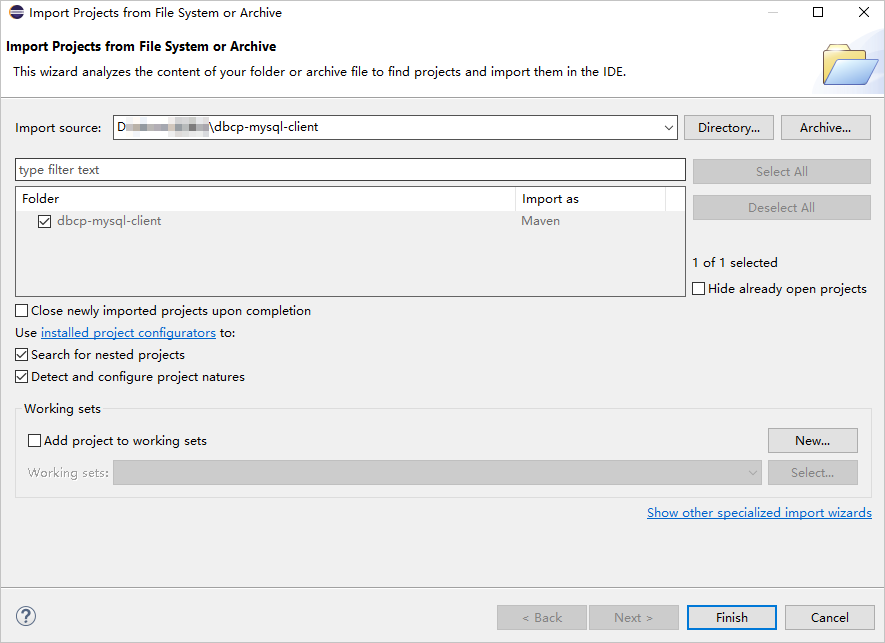
-
View the project.
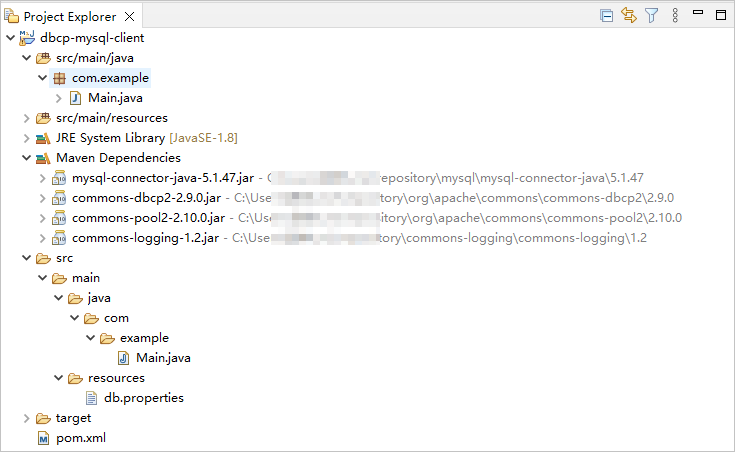
Step 2: Obtain the seekdb URL
-
Contact the seekdb deployment personnel or administrator to obtain the corresponding database connection string.
Example:
mysql -hxxx.xxx.xxx.xxx -P2881 -uroot -p****** -DtestFor more information about the connection string, see Connect to seekdb by using a MySQL client.
-
Fill in the corresponding information in the URL based on the seekdb connection string.
jdbc:mysql://$host:$port/$database_name?user=$user_name&password=$passwordParameter description:
$host: the IP address for connecting to seekdb. Replace it with the actual IP address. You can also use the local IP address or 127.0.0.1.$port: the port for connecting to seekdb. Replace it with the actual port. The default port is 2881, which can be customized when deploying seekdb.$database_name: the name of the database to be accessed.user_name: the connection account. The format isusername.password: the account password.
For more information about the MySQL Connector/J connection properties, see Configuration Properties.
Example:
jdbc:mysql://xxx.xxx.xxx.xxx:2881/test?user=root&password=******
Step 3: Modify the database connection information in the dbcp-mysql-client project
Modify the database connection information in the dbcp-mysql-client/src/main/resources/db.properties file based on the information obtained in Step 2: Obtain the seekdb URL.
Example:
- The IP address of seekdb is
xxx.xxx.xxx.xxx. - The access port is 2881.
- The name of the database to be accessed is
test. - The connection account is
root. - The password is
******.
Sample code:
...
url=jdbc:mysql://xxx.xxx.xxx.xxx:2881/test
username=root
password=******
...
Step 4: Run the dbcp-mysql-client project
-
In the Project Explorer view, locate and expand the src/main/java directory.
-
Right-click the Main.java file and choose Run As > Java Application.
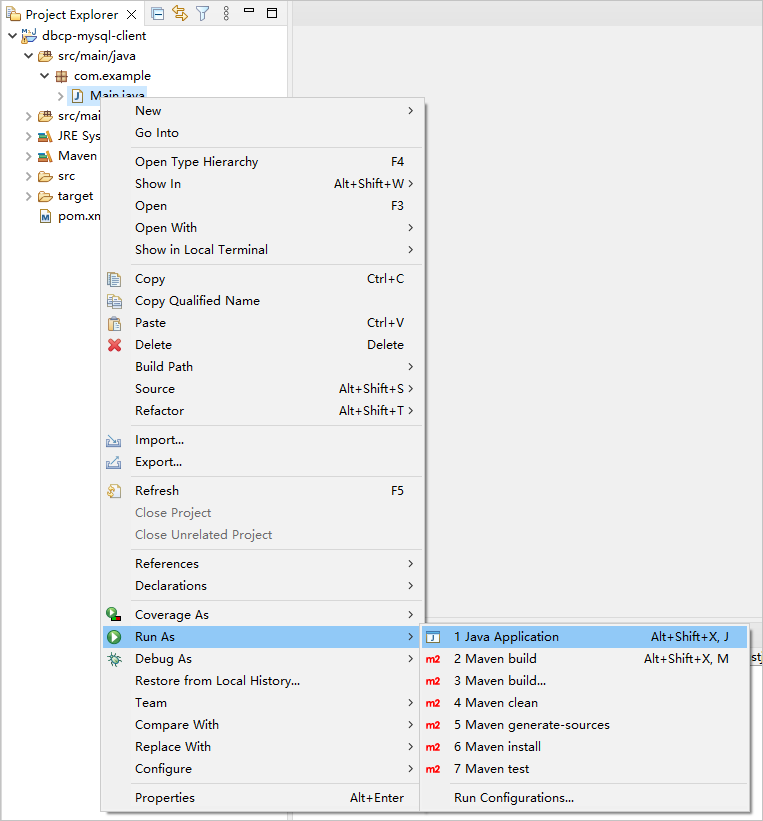
-
View the project logs and output results in the Eclipse console window.

-
You can also execute the following SQL statement in seekdb to view the results.
SELECT * FROM test_tbl1;The returned result is as follows:
+------+--------------+
| id   | name         |
+------+--------------+
|    5 | test_update  |
|    6 | test_insert6 |
|    7 | test_insert7 |
|    8 | test_insert8 |
|    9 | test_insert9 |
+------+--------------+
5 rows in set
Project code
Click dbcp-mysql-client to download the project code, which is a compressed file named dbcp-mysql-client.zip.
After decompressing it, you will find a folder named dbcp-mysql-client. The directory structure is as follows:
dbcp-mysql-client
├── src
│   └── main
│       ├── java
│       │   └── com
│       │       └── example
│       │           └── Main.java
│       └── resources
│           └── db.properties
└── pom.xml
File description:
src: the root directory of the source code.main: the main code directory, containing the core logic of the application.java: the directory for Java source code.com: the directory for Java packages.example: the directory for packages of the sample project.Main.java: a sample main class file containing logic for creating tables, inserting, deleting, updating, and querying data.resources: the directory for resource files, including configuration files.db.properties: the configuration file for the connection pool, containing relevant database connection parameters.pom.xml: the configuration file for the Maven project, used to manage project dependencies and build settings.
Code in pom.xml
The pom.xml file is a configuration file for Maven projects, which defines the dependencies, plugins, and build rules of the project. Maven is a Java project management tool that can automatically download dependencies, compile, and package projects.
The pom.xml file in this topic contains the following parts:
-
File declaration statement.
This statement declares the file as an XML file that uses XML version
1.0and character encodingUTF-8.Sample code:
<?xml version="1.0" encoding="UTF-8"?> -
Configure the namespaces and POM model version.
- Use
xmlnsto specify the POM namespace ashttp://maven.apache.org/POM/4.0.0. - Use
xmlns:xsito specify the XML namespace ashttp://www.w3.org/2001/XMLSchema-instance. - Use
xsi:schemaLocationto specify the POM namespace ashttp://maven.apache.org/POM/4.0.0and the location of the POM XSD file ashttp://maven.apache.org/xsd/maven-4.0.0.xsd. - Use
<modelVersion>to specify the POM model version as4.0.0.
Sample code:
<project xmlns="http://maven.apache.org/POM/4.0.0"
         xmlns:xsi="http://www.w3.org/2001/XMLSchema-instance"
         xsi:schemaLocation="http://maven.apache.org/POM/4.0.0 http://maven.apache.org/xsd/maven-4.0.0.xsd">
  <modelVersion>4.0.0</modelVersion>

 <!-- Other configurations -->

</project> - Use
-
Configure basic information.
- Use
<groupId>to specify the project group ascom.example. - Use
<artifactId>to specify the project name asdbcp-mysql-client. - Use
<version>to specify the project version as1.0-SNAPSHOT.
Sample code:
    <groupId>com.example</groupId>
    <artifactId>dbcp-mysql-client</artifactId>
<version>1.0-SNAPSHOT</version> - Use
-
Configure the properties of the project source files.
Specify the Maven compiler plugin as
maven-compiler-plugin, and set the source code and target Java versions to 8. This means that the project's source code is written using Java 8 features, and the compiled bytecode will also be compatible with the Java 8 runtime environment. This setup ensures that the project can correctly handle the syntax and features of Java 8 during compilation and runtime.infoJava 1.8 and Java 8 are different names for the same version.
Sample code:
    <build>
        <plugins>
            <plugin>
                <groupId>org.apache.maven.plugins</groupId>
                <artifactId>maven-compiler-plugin</artifactId>
                <configuration>
                    <source>8</source>
                    <target>8</target>
                </configuration>
            </plugin>
        </plugins>
</build> -
Configure the components that the project depends on.
Use
<dependency>to define the dependencies:-
MySQL JDBC dependency:
- Use
<groupId>to specify the dependency group asmysql. - Use
<artifactId>to specify the dependency name asmysql-connector-java. - Use
<version>to specify the dependency version as5.1.47.
- Use
-
dbcp dependency:
- Use
<groupId>to specify the dependency group asorg.apache.commons. - Use
<artifactId>to specify the dependency name ascommons-dbcp2. - Use
<version>to specify the dependency version as2.9.0.
- Use
Sample code:
    <dependencies>
        <dependency>
            <groupId>mysql</groupId>
            <artifactId>mysql-connector-java</artifactId>
            <version>5.1.47</version>
        </dependency>
        <dependency>
            <groupId>org.apache.commons</groupId>
            <artifactId>commons-dbcp2</artifactId>
            <version>2.9.0</version>
        </dependency>
</dependencies> -
Introduction to db.properties
db.properties is the connection pool configuration file for the example in this topic. It contains configuration properties for the connection pool, including the driver class name, database URL, username, password, connection pool size and limits, connection timeout, and options for handling abandoned connections.
The code in the db.properties file in this topic mainly includes the following parts:
-
Configure database connection parameters.
-
Set the driver class name. Here, it is the class name of the MySQL JDBC driver,
com.mysql.jdbc.Driver. 2. Set the database connection URL, including the host IP address, port number, and the database to be accessed. 3. Set the database username. 4. Set the database password. 5. Set the connection attributes, whereuseSSL=falseindicates that SSL encryption is not used for the connection, andcharacterEncoding=UTF-8indicates that UTF-8 encoding is used for data transmission.
Code:
    driverClassName=com.mysql.jdbc.Driver
    url=jdbc:mysql://$host:$port/$database_name
    username=$user_name
    password=$password
    connectionProperties=useSSL=false;characterEncoding=UTF-8
Parameter description:
$host: the IP address for connecting to seekdb. Replace it with an actual IP address. You can also use the local IP address or 127.0.0.1.$port: the port for connecting to seekdb. Replace it with an actual port number. The default port is 2881, which can be customized when you deploy seekdb.$database_name: the name of the database to be accessed.$user_name: the username for the connection. Format:username.$password: the password for the account.
-
Configure other DBCP connection pool parameters.
-
Set the initial size of the connection pool to
30, which is the number of connections to be created initially in the connection pool. 2. Set the maximum number of connections in the connection pool to30, which is the maximum number of connections allowed in the connection pool. 3. Set the maximum number of idle connections allowed in the connection pool to10. 4. Set the minimum number of idle connections in the connection pool to5. If the number of idle connections is less than this value, the connection pool creates new connections. 5. Set the maximum wait time (in milliseconds) for obtaining a connection from the connection pool to1000. If all connections in the connection pool are occupied and there are no available connections, the operation to obtain a connection will wait until an available connection is available or the maximum wait time is exceeded. 6. Set the timeout (in seconds) before abandoned connections are removed to1.
The default value of removeAbandonedTimeout is 300 seconds. In this example, it is set to 1 second for testing purposes. You can adjust this value as needed to meet the requirements of your application.
- Whether to recycle connections that are no longer used in the program:
- Set whether to detect and remove abandoned connections during maintenance to
true.- Set whether to detect and remove abandoned connections when borrowing connections from the connection pool to
true.
- Set whether to detect and remove abandoned connections when borrowing connections from the connection pool to
Code:
    initialSize=30
    maxTotal=30
    maxIdle=10
    minIdle=5
    maxWaitMillis=1000
    removeAbandonedTimeout=1

    removeAbandonedOnMaintenance=true
    removeAbandonedOnBorrow=true
The specific configuration of parameters depends on the project requirements and the characteristics of the database. We recommend that you adjust and configure the parameters as needed. For more information about DBCP connection pool parameters, see BasicDataSource Configuration Parameters.
Basic data source configuration parameters of the DBCP connection pool:
| Classification | Parameter | Default value | Description |
|---|---|---|---|
| Required parameters | driverClass | N/A | Specifies the class name of the database driver. |
| Required parameters | url | N/A | Specifies the URL used to connect to the database. |
| Required parameters | username | N/A | Specifies the username used to connect to the database. |
| Required parameters | password | N/A | Specifies the password used to connect to the database. |
| Recommended parameters | initialSize | 0 | Specifies the initial size of the connection pool, that is, the number of initial connections created when the connection pool is started. If you set this parameter to a value greater than 0, the specified number of connections will be created when the connection pool is initialized. This can help to create connections in advance and reduce the latency when the client requests a connection for the first time. |
| Recommended parameters | maxTotal | 8 | Specifies the maximum number of connections allowed in the connection pool. If you set this parameter to a negative value, no limit is imposed. |
| Recommended parameters | maxIdle | 8 | Specifies the maximum number of idle connections allowed in the connection pool without releasing additional connections. If you set this parameter to a negative value, no limit is imposed. |
| Recommended parameters | minIdle | 0 | Specifies the minimum number of idle connections allowed in the connection pool without releasing additional connections. If you set this parameter to a negative value, no limit is imposed. |
| Recommended parameters | maxWaitMillis | indefinitely | Specifies the maximum waiting time (in milliseconds) for obtaining a connection from the connection pool. If you set this parameter to -1, the connection pool will wait indefinitely. If you set this parameter to a positive value, the waiting operation will wait for the specified time when all connections in the connection pool are occupied. If the time is exceeded, an exception will be thrown. |
| Recommended parameters | validationQuery | N/A | Specifies the SQL query statement used to verify whether a connection is valid. If you specify this parameter, the query must be a SQL SELECT statement that returns at least one row. If you do not specify this parameter, the connection will be verified by calling the isValid() method. |
| Recommended parameters | testOnBorrow | true | Specifies whether to verify the connection when borrowing an object from the connection pool. If the object cannot be verified, it will be removed from the connection pool, and another object will be borrowed. |
| Recommended parameters | testWhileIdle | false | Specifies whether to verify the connection when it is idle. If you set this parameter to true, the connection pool will periodically execute the validation query to check the validity of idle connections. If the object fails the verification, it will be removed from the connection pool. |
| 可选参数 | connectionProperties | N/A | Specifies additional connection properties in the form of key-value pairs, which will be passed to the underlying JDBC driver when a database connection is obtained. The string format must be propertyName=property; Notice:The username and password attributes will be explicitly passed, so they do not need to be included here. |
| Recommended parameters | removeAbandonedOnMaintenance removeAbandonedOnBorrow | false | These parameters control the behavior of removing connections that are considered abandoned. removeAbandonedOnMaintenance: If you set this parameter to true, the connection pool will remove connections that are considered abandoned during maintenance cycles (when eviction ends). However, this parameter only takes effect if maintenance cycles are enabled (by setting timeBetweenEvictionRunsMillis to a positive value).removeAbandonedOnBorrow: If you set this parameter to true, the connection pool will check for and remove connections that are considered abandoned each time a connection is borrowed from the pool. Additionally, the removal operation must meet the following two conditions:getNumActive() > getMaxTotal() - 3: The current number of active connections exceeds the maximum number of connections minus 3.getNumIdle() < 2: The current number of idle connections is less than 2.By setting both parameters to true, the connection pool can automatically detect and remove abandoned connections. Abandoned connections are those that have been unused for a long time, which may be due to the application not properly closing the connections. Removing these abandoned connections can release database resources and improve the performance and efficiency of the connection pool. |
Main.java code
The Main.java file is part of the sample program. It demonstrates how to obtain a database connection using a DBCP connection pool and perform a series of database operations, including table creation, data insertion, data deletion, data update, data query, and output of query results.
The Main.java file in this topic contains the following main parts:
- Import the required classes and interfaces.
Import the required classes and interfaces, including those for file reading, database operations, and database connection pools. These classes and interfaces are used in the subsequent code.
- Declare a package named
com.exampleto store the current Java class. 2. Import thejava.io.FileInputStreamclass for file reading. 3. Import thejava.sql.Connectioninterface for database connections. 4. Import thejava.sql.PreparedStatementinterface for precompiled SQL statements. 5. Import thejava.sql.ResultSetinterface for database query results. 6. Import thejava.sql.SQLExceptionexception class for SQL operation exceptions. 7. Import thejava.util.Propertiesclass for loading configuration files. 8. Import theorg.apache.commons.dbcp2.BasicDataSourceclass for database connection pools. 9. Import theorg.apache.commons.dbcp2.BasicDataSourceFactoryclass for creating database connection pools.
Sample code:
    package com.example;

    import java.io.FileInputStream;
    import java.sql.Connection;
    import java.sql.PreparedStatement;
    import java.sql.ResultSet;
    import java.sql.SQLException;
    import java.util.Properties;

    import org.apache.commons.dbcp2.BasicDataSource;
    import org.apache.commons.dbcp2.BasicDataSourceFactory;
-
Define the class name and method.
-
Create the Main class and define a
mainmethod as the entry point of the program. 2. In themainmethod, first call thecreateDataSource()method to create a connection pool objectdataSource. 3. Use thetry-with-resourcesstatement to automatically close resources when the lifecycle of the connection pool object ends. 4. In thetryblock, call thegetConnection()method to obtain a database connection objectconnfrom the connection pool. 5. Call thecreateTable(),insertData(),deleteData(),updateData(), andqueryData()methods in sequence to perform the corresponding database operations. 6. In the event of an exception, print the exception information using thecatchblock.
Sample code:
    public class Main {

public static void main(String[] args) {
            try (BasicDataSource dataSource = createDataSource()) {
                try (Connection conn = dataSource.getConnection()) {
                    createTable(conn);
                    insertData(conn);
                    deleteData(conn);
                    updateData(conn);
                    queryData(conn);
                }
            } catch (Exception e) {
                e.printStackTrace();
            }
        }

// Create a connection pool.
        // Define a method for creating tables.
        // Define a method for inserting data.
        // Define a method for deleting data.
        // Define a method for updating data.
        // Define a method for querying data.
    }
- Create a connection pool.
Provide a method for conveniently creating a database connection pool. The method initializes the connection pool object by reading parameters from the configuration file. The specific steps are as follows:
- Define a private static method
createDataSource()that returns aBasicDataSourceobject. The method may throw anExceptionexception. 2. Create aPropertiesobjectpropsfor storing database connection configuration information. 3. Create aFileInputStreamobjectisfor reading thedb.propertiesfile located in thesrc/main/resourcesdirectory. 4. Use theload()method to load key-value pairs from thedb.propertiesfile into thepropsobject. 5. Call theBasicDataSourceFactory.createDataSource(props)method to create and return aBasicDataSourceobject using thepropsobject as the parameter.
Sample code:
        private static BasicDataSource createDataSource() throws Exception {
            Properties props = new Properties();
            FileInputStream is = new FileInputStream("src/main/resources/db.properties");
            props.load(is);

            return BasicDataSourceFactory.createDataSource(props);
        }
- Define a method for creating tables.
Provide a method for creating a specified table in the database. It accepts a connection object as a parameter and uses a precompiled approach to execute the SQL statement for creating the table. The specific steps are as follows:
- Define a private static method
createTable()that accepts aConnectionobject as a parameter. The method may throw anSQLExceptionexception. 2. Define a string variablecreateTableSqlfor storing the SQL statement for creating the table. The SQL statement specifies the table name astest_tbl1and defines two columns: one is anINTcolumn namedid, and the other is aVARCHAR(32)column namedname. 3. Use theconn.prepareStatement(createTableSql)method to create aPreparedStatementobjectcreateTableStmtfor executing precompiled SQL statements. 4. Call theexecute()method to execute the SQL statement for creating the table.
Sample code:
        private static void createTable(Connection conn) throws SQLException {
            String createTableSql = "CREATE TABLE test_tbl1 (id INT, name VARCHAR(32))";
            try (PreparedStatement createTableStmt = conn.prepareStatement(createTableSql)) {
                createTableStmt.execute();
            }
        }
- Define a method for inserting data.
Provide a method for inserting specified data into a table in the database. It accepts a connection object as a parameter and uses a precompiled approach to execute the SQL statement for inserting data. The specific steps are as follows:
-
Define a private static method
insertData()that accepts aConnectionobject as a parameter. The method may throw anSQLExceptionexception. 2. Define a string variableinsertDataSqlfor storing the SQL statement for inserting data. 3. Use theconn.prepareStatement(insertDataSql)method to create aPreparedStatementobjectinsertDataStmtfor executing precompiled SQL statements. 4. Use aforloop to insert data into the table: -
Loop
10times and insert one piece of data in each iteration. 2. Use thesetInt()method to set the value of the loop variableias the first parameter value in the SQL statement. 3. Use thesetString()method to set the stringtest_insert + ias the second parameter value in the SQL statement. 4. Call theexecuteUpdate()method to execute the SQL statement for inserting data into the database.
Sample code:
        private static void insertData(Connection conn) throws SQLException {
            String insertDataSql = "INSERT INTO test_tbl1 (id, name) VALUES (?, ?)";
            try (PreparedStatement insertDataStmt = conn.prepareStatement(insertDataSql)) {
                for (int i = 0; i < 10; i++) {
                    insertDataStmt.setInt(1, i);
                    insertDataStmt.setString(2, "test_insert" + i);
                    insertDataStmt.executeUpdate();
                }
            }
        }
- Define a method for deleting data.
Provide a method for deleting data that meets specific conditions from the database. It accepts a connection object as a parameter and uses a precompiled approach to execute the SQL statement for deleting data. The steps are as follows:
- Define a private static method
deleteData()that accepts aConnectionobject as a parameter and may throw anSQLException. 2. Define a string variabledeleteDataSqlto store the SQL statement for deleting data. 3. Use theconn.prepareStatement(deleteDataSql)method to create aPreparedStatementobjectdeleteDataStmtfor executing the precompiled SQL statement. 4. Use thesetInt()method to set the value 5 as the parameter value in the SQL statement. 5. Call theexecuteUpdate()method to execute the SQL statement for deleting data that meets the conditions from the database.
Code:
        private static void deleteData(Connection conn) throws SQLException {
            String deleteDataSql = "DELETE FROM test_tbl1 WHERE id < ?";
            try (PreparedStatement deleteDataStmt = conn.prepareStatement(deleteDataSql)) {
                deleteDataStmt.setInt(1, 5);
                deleteDataStmt.executeUpdate();
            }
        }
- Define a method for updating data.
Provide a method for updating data that meets specific conditions in the database. It accepts a connection object as a parameter and uses a precompiled approach to execute the SQL statement for updating data. The steps are as follows:
- Define a private static method
updateData()that accepts aConnectionobject as a parameter and may throw anSQLException. 2. Define a string variableupdateDataSqlto store the SQL statement for updating data. 3. Use theconn.prepareStatement(updateDataSql)method to create aPreparedStatementobjectupdateDataStmtfor executing the precompiled SQL statement. 4. Use thesetString()method to set the valuetest_updateas the first parameter value in the SQL statement. 5. Use thesetInt()method to set the value5as the second parameter value in the SQL statement. 6. Call theexecuteUpdate()method to execute the SQL statement for updating data that meets the conditions in the database.
Code:
        private static void updateData(Connection conn) throws SQLException {
            String updateDataSql = "UPDATE test_tbl1 SET name = ? WHERE id = ?";
            try (PreparedStatement updateDataStmt = conn.prepareStatement(updateDataSql)) {
                updateDataStmt.setString(1, "test_update");
                updateDataStmt.setInt(2, 5);
                updateDataStmt.executeUpdate();
            }
        }
- Define a method for querying data.
Provide a method for querying data from the database and processing the results. It accepts a connection object as a parameter and uses a precompiled approach to execute the SQL statement for querying data. The steps are as follows:
-
Define a private static method
queryData()that accepts aConnectionobject as a parameter and may throw anSQLException. 2. Define a string variablequeryDataSqlto store the SQL statement for querying data. 3. Use theconn.prepareStatement(queryDataSql)method to create aPreparedStatementobjectqueryDataStmtfor executing the precompiled SQL statement. 4. Execute the SQL query using thequeryDataStmt.executeQuery()method and use theResultSetobjectrsto receive the query results. 5. Use awhileloop to traverse the query result set by calling thers.next()method: -
Use the
getInt()method to retrieve the integer value of the column namedidin the result set and assign it to the variableid. 2. Use thegetString()method to retrieve the string value of the column namednamein the result set and assign it to the variablename. 3. Print theidandnamevalues from the query results.
Code:
        private static void queryData(Connection conn) throws SQLException {
            String queryDataSql = "SELECT * FROM test_tbl1";
            try (PreparedStatement queryDataStmt = conn.prepareStatement(queryDataSql)) {
                try (ResultSet rs = queryDataStmt.executeQuery()) {
                    while (rs.next()) {
                        int id = rs.getInt("id");
                        String name = rs.getString("name");
                        System.out.println("id: " + id + ", name: " + name);
                    }
                }
            }
        }
Full code
pom.xml
<?xml version="1.0" encoding="UTF-8"?>
<project xmlns="http://maven.apache.org/POM/4.0.0"
         xmlns:xsi="http://www.w3.org/2001/XMLSchema-instance"
         xsi:schemaLocation="http://maven.apache.org/POM/4.0.0 http://maven.apache.org/xsd/maven-4.0.0.xsd">
    <modelVersion>4.0.0</modelVersion>

    <groupId>com.example</groupId>
    <artifactId>dbcp-mysql-client</artifactId>
    <version>1.0-SNAPSHOT</version>
    <build>
        <plugins>
            <plugin>
                <groupId>org.apache.maven.plugins</groupId>
                <artifactId>maven-compiler-plugin</artifactId>
                <configuration>
                    <source>8</source>
                    <target>8</target>
                </configuration>
            </plugin>
        </plugins>
    </build>

    <dependencies>
        <dependency>
            <groupId>mysql</groupId>
            <artifactId>mysql-connector-java</artifactId>
            <version>5.1.47</version>
        </dependency>
        <dependency>
            <groupId>org.apache.commons</groupId>
            <artifactId>commons-dbcp2</artifactId>
            <version>2.9.0</version>
        </dependency>
    </dependencies>
</project>
db.properties
# Database Connect Information
driverClassName=com.mysql.jdbc.Driver
url=jdbc:mysql://$host:$port/$database_name
username=$user_name
password=$password
connectionProperties=useSSL=false;characterEncoding=UTF-8

# ConnectionPool Parameters
initialSize=30
maxTotal=30
maxIdle=10
minIdle=5
maxWaitMillis=1000
removeAbandonedTimeout=1

removeAbandonedOnMaintenance=true
removeAbandonedOnBorrow=true
Main.java
package com.example;

import java.io.FileInputStream;
import java.sql.Connection;
import java.sql.PreparedStatement;
import java.sql.ResultSet;
import java.sql.SQLException;
import java.util.Properties;

import org.apache.commons.dbcp2.BasicDataSource;
import org.apache.commons.dbcp2.BasicDataSourceFactory;

public class Main {

    public static void main(String[] args) {
        try (BasicDataSource dataSource = createDataSource()) {
            try (Connection conn = dataSource.getConnection()) {
                createTable(conn);
                insertData(conn);
                deleteData(conn);
                updateData(conn);
                queryData(conn);
            }
        } catch (Exception e) {
            e.printStackTrace();
        }
    }

    // Create ConnectionPool
    private static BasicDataSource createDataSource() throws Exception {
        Properties props = new Properties();
        FileInputStream is = new FileInputStream("src/main/resources/db.properties");
        props.load(is);

        return BasicDataSourceFactory.createDataSource(props);
    }

    // Create table
    private static void createTable(Connection conn) throws SQLException {
        String createTableSql = "CREATE TABLE test_tbl1 (id INT, name VARCHAR(32))";
        try (PreparedStatement createTableStmt = conn.prepareStatement(createTableSql)) {
            createTableStmt.execute();
        }
    }

    // Insert data
    private static void insertData(Connection conn) throws SQLException {
        String insertDataSql = "INSERT INTO test_tbl1 (id, name) VALUES (?, ?)";
        try (PreparedStatement insertDataStmt = conn.prepareStatement(insertDataSql)) {
            for (int i = 0; i < 10; i++) {
                insertDataStmt.setInt(1, i);
                insertDataStmt.setString(2, "test_insert" + i);
                insertDataStmt.executeUpdate();
            }
        }
    }

    // Delete data
    private static void deleteData(Connection conn) throws SQLException {
        String deleteDataSql = "DELETE FROM test_tbl1 WHERE id < ?";
        try (PreparedStatement deleteDataStmt = conn.prepareStatement(deleteDataSql)) {
            deleteDataStmt.setInt(1, 5);
            deleteDataStmt.executeUpdate();
        }
    }

    // Update data
    private static void updateData(Connection conn) throws SQLException {
        String updateDataSql = "UPDATE test_tbl1 SET name = ? WHERE id = ?";
        try (PreparedStatement updateDataStmt = conn.prepareStatement(updateDataSql)) {
            updateDataStmt.setString(1, "test_update");
            updateDataStmt.setInt(2, 5);
            updateDataStmt.executeUpdate();
        }
    }

    // Query data
    private static void queryData(Connection conn) throws SQLException {
        String queryDataSql = "SELECT * FROM test_tbl1";
        try (PreparedStatement queryDataStmt = conn.prepareStatement(queryDataSql)) {
            try (ResultSet rs = queryDataStmt.executeQuery()) {
                while (rs.next()) {
                    int id = rs.getInt("id");
                    String name = rs.getString("name");
                    System.out.println("id: " + id + ", name: " + name);
                }
            }
        }
    }
}
References
For more information about MySQL Connector/J, see Overview of MySQL Connector/J.