Integrate OceanBase MCP Server with Augment Code

MCP (Model Context Protocol) is an open-source protocol released by Anthropic in November 2024. It enables large language models (LLMs) to interact with external tools or data sources. With MCP, users no longer need to manually copy and execute the output of an LLM. Instead, the LLM can directly instruct the tool to perform the corresponding action (Action).

The MCP Server provides the capability for large models to interact with seekdb and execute SQL statements. It is open-sourced on GitHub and can be quickly integrated with a suitable client to build a project prototype.

Augment Code is a developer AI platform that helps you understand your code, debug issues, and release features faster. It understands your codebase and can assist with chatting, next-step editing, and code completion to help you work more efficiently.

This topic shows how to use Augment Code and how to quickly build a backend application using OceanBase MCP Server.

Prerequisites

  • You have deployed seekdb.

  • Install Python 3.11 or later and the corresponding pip. If the Python version on your machine is low, you can use Miniconda to create a new Python 3.11 or later environment. For more information, see Miniconda installation guide.

  • Install Git based on the operating system.

  • Install the Python package manager uv. After the installation is complete, run the uv --version command to verify whether the installation is successful:

    pip install uv
    uv --version
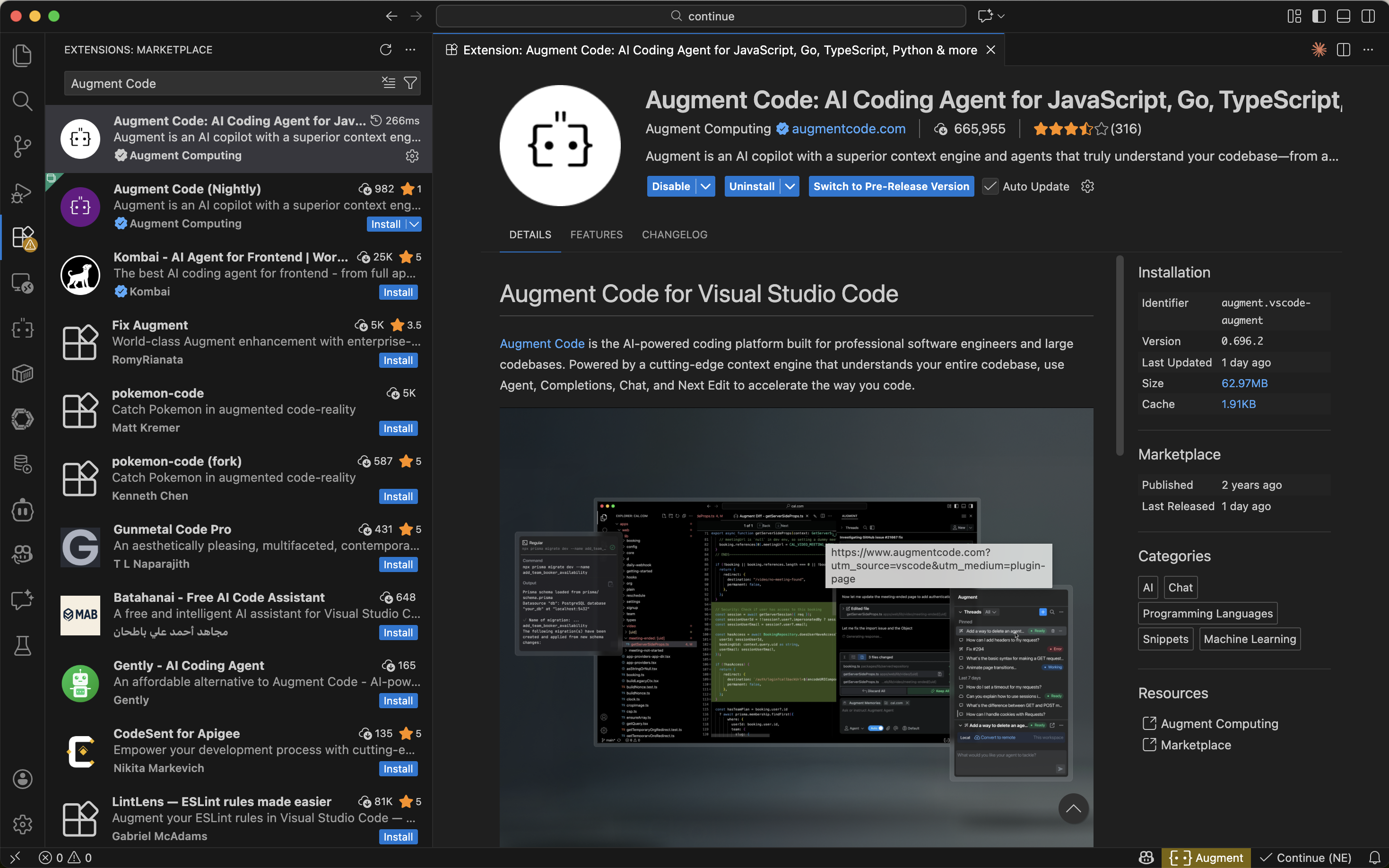
  • Install Augment Code:

    1. Open VS Code (if not installed, refer to the official documentation for installation).

    2. Click the Extensions icon in the sidebar.

    3. Search for "Augment Code" and click Install.

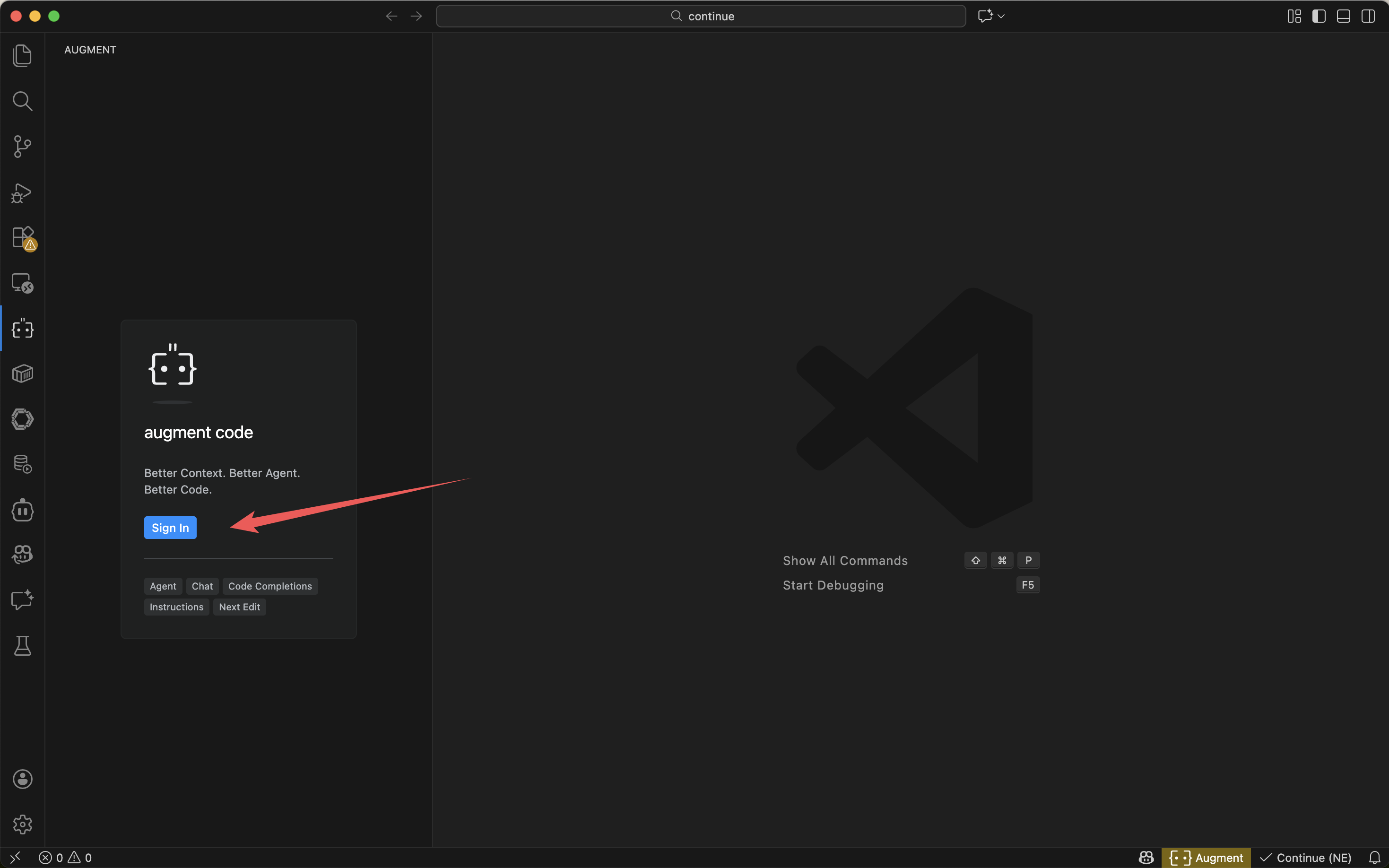
    4. Register and log in to your Augment Code account.

      image01

Step 1: Obtain the database connection information

Contact the seekdb deployment personnel or administrator to obtain the corresponding database connection string, for example:

mysql -h$host -P$port -u$user_name -p$password -D$database_name

Parameter description:

  • $host: the IP address for connecting to seekdb.

  • $port: the port for connecting to seekdb, which is 2881 by default.

  • $database_name: the name of the database to be accessed.

    tip

    The user for connection must have the CREATE, INSERT, DROP, and SELECT privileges on the database.

  • $user_name: the database connection account.

  • $password: the account password.

Step 2: Configure OceanBase MCP Server

Clone the OceanBase MCP Server repository

Run the following command to download the source code to your local machine:

git clone https://github.com/oceanbase/awesome-oceanbase-mcp.git

Go to the source code directory:

cd awesome-oceanbase-mcp

Install dependencies

Run the following command in the oceanbase_mcp_server directory to create a virtual environment and install the dependencies:

uv venv
source .venv/bin/activate
uv pip install .

Add and configure MCP servers

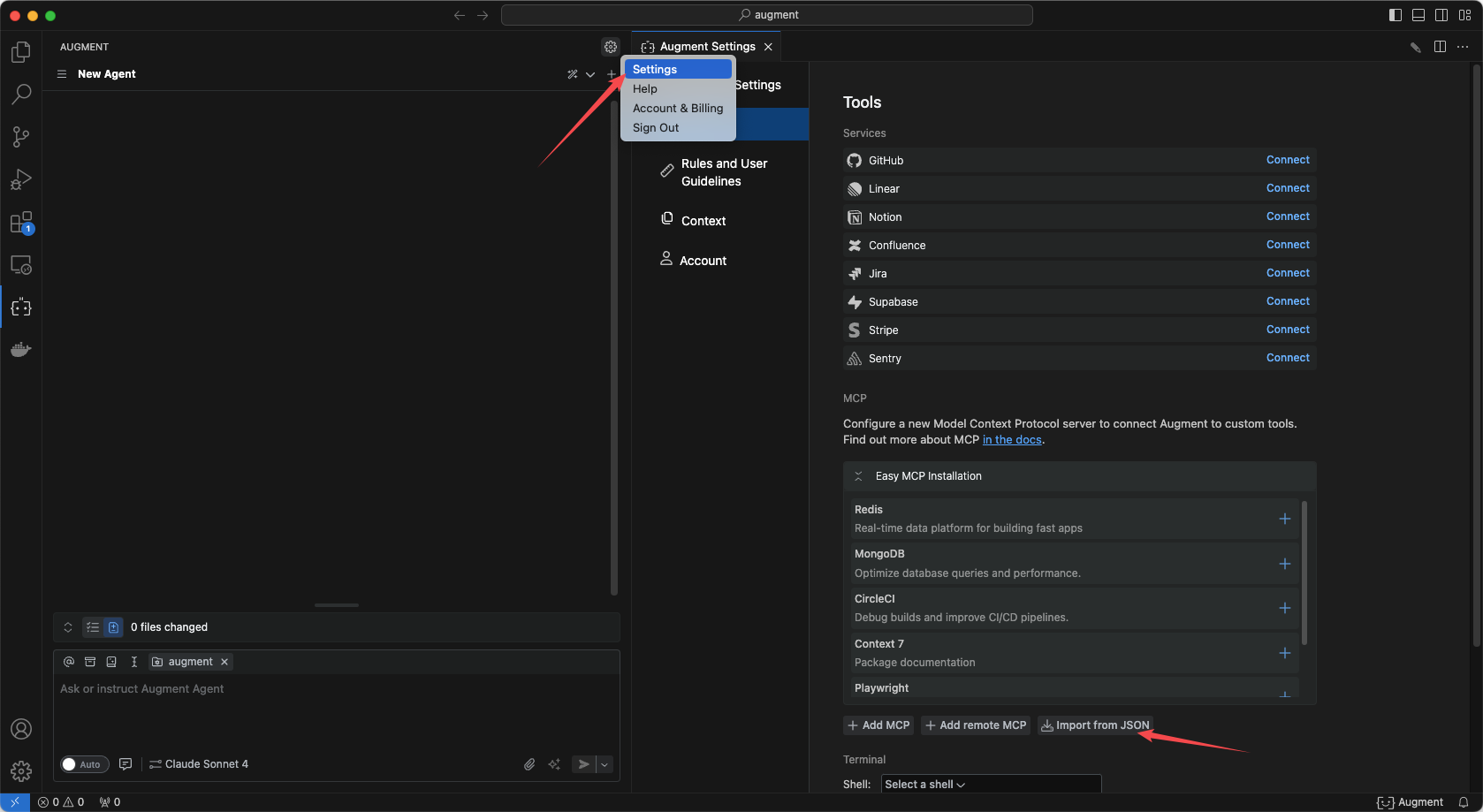
  1. Configure OceanBase MCP Server in Augment Code.

    image02

  2. Click Import from json and fill in the MCP configuration file.
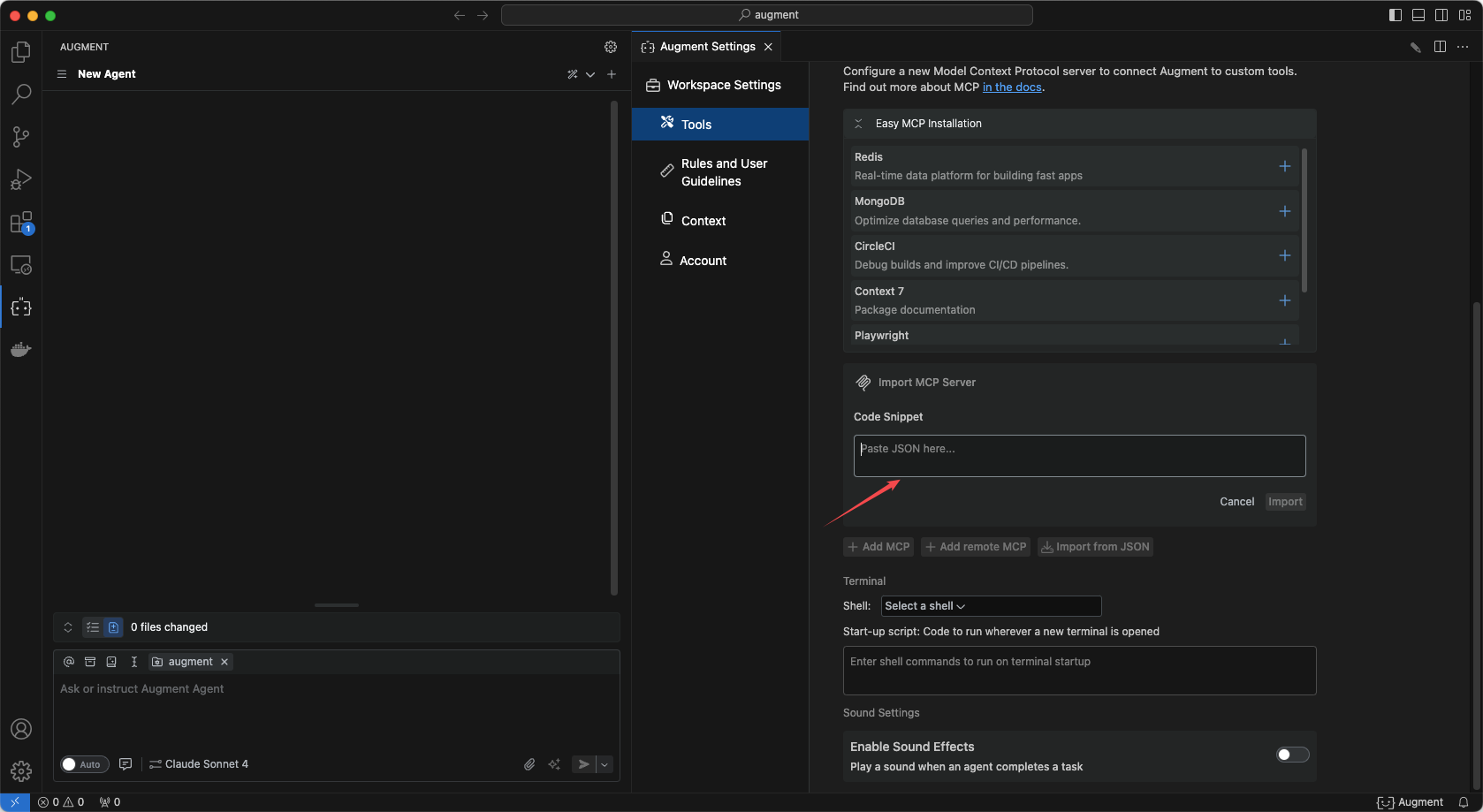
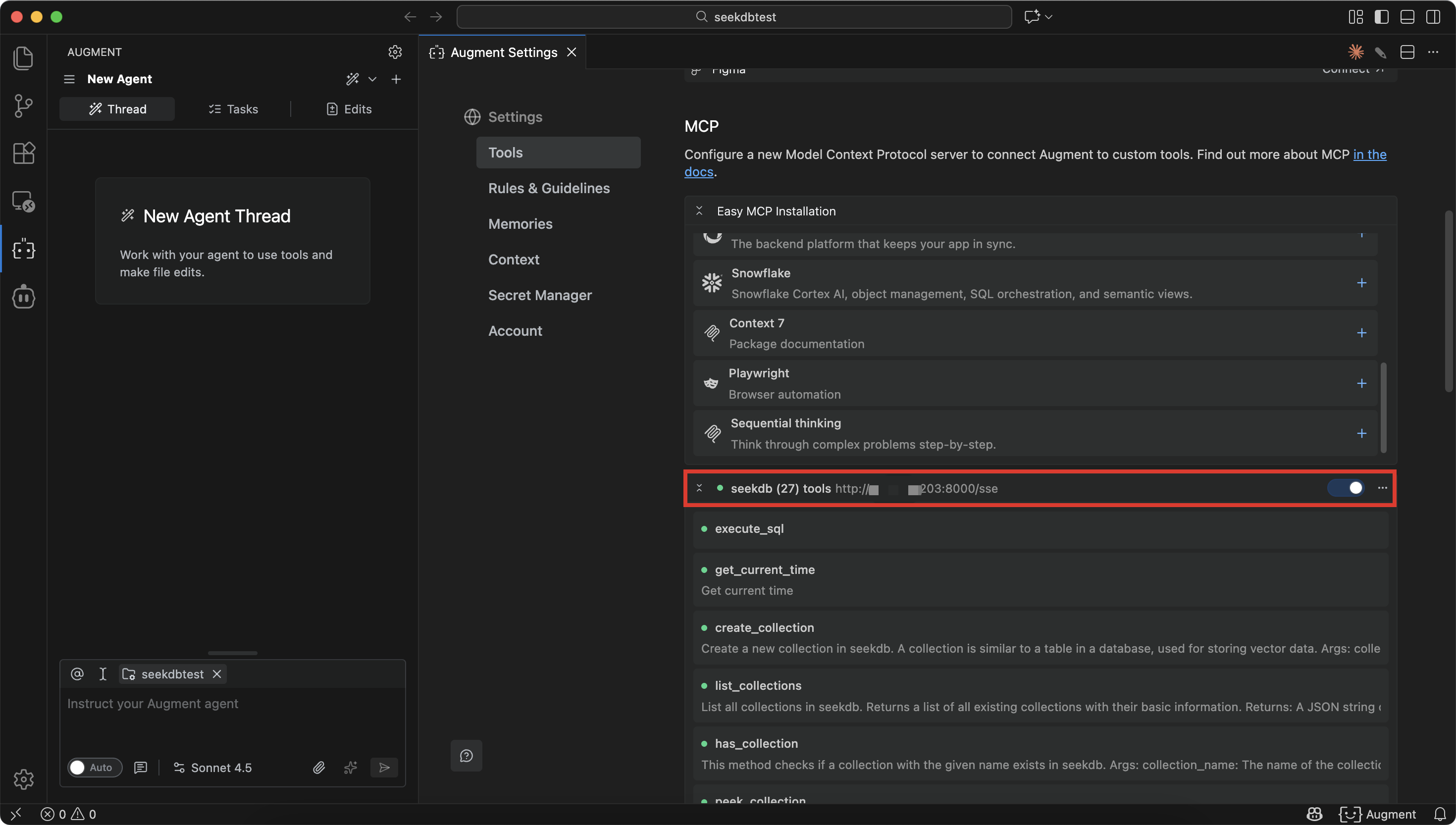
    image03

    image04

  3. Fill in the configuration file and click Confirm.

    Replace /path/to/your/oceanbase_mcp_server with the absolute path of the oceanbase_mcp_server folder. Replace OB_HOST, OB_PORT, OB_USER, OB_PASSWORD, and OB_DATABASE with the corresponding information of your database:

    {
    "mcpServers": {
    "oceanbase": {
    "command": "uv",
    "args": [
    "--directory",
    "/path/to/your/oceanbase_mcp_server/src/oceanbase_mcp_server",
    "run",
    "oceanbase_mcp_server"
    ],
    "env": {
    "OB_HOST": "***",
    "OB_PORT": "***",
    "OB_USER": "***",
    "OB_PASSWORD": "***",
    "OB_DATABASE": "***"
    }
    }
    }
    }
  4. Verify whether you can connect to the database.

    Enter the prompt "Create a customer table with ID as the primary key, containing name, age, telephone, and location fields":

    image05

    If Augment Code displays the number of tables in the test database, it indicates that you can connect to seekdb.

Step 3: Create a RESTful API project with FastAPI

FastAPI is a Python web framework that allows you to quickly build RESTful APIs.

  1. Create a table.

    Enter the prompt "Create a customer table with the ID as the primary key and fields for name, age, telephone, and location":

    image06

  2. Insert test data.

    Enter the prompt "Insert 10 test data entries":

    image07

  3. Create a FastAPI project.

    Enter the prompt "Create a FastAPI project and generate a RESTful API based on the customer table". Multiple files are automatically generated, the code is automatically fixed, and the FastAPI project is started:

    image08

    image09

  4. View the data in the table.

    Run the command curl http://127.0.0.1:8000/customers in the command line or use another request tool to view the data in the table:

    curl http://127.0.0.1:8000/customers
    [{"name":"Zhang San","age":28,"telephone":"13812345678","location":"Chaoyang District, Beijing","id":1},{"name":"Li Si","age":35,"telephone":"13987654321","location":"Pudong New Area, Shanghai","id":2},{"name":"Wang Wu","age":42,"telephone":"15612345678","location":"Tianhe District, Guangzhou","id":3},{"name":"Zhao Liu","age":29,"telephone":"18712345678","location":"Nanshan District, Shenzhen","id":4},{"name":"Qian Qi","age":33,"telephone":"13512345678","location":"West Lake District, Hangzhou","id":5},{"name":"Sun Ba","age":26,"telephone":"15987654321","location":"Jinjiang District, Chengdu","id":6},{"name":"Zhou Ji","age":38,"telephone":"18612345678","location":"Jianghan District, Wuhan","id":7},{"name":"Wu Shi","age":31,"telephone":"13712345678","location":"Gulou District, Nanjing","id":8},{"name":"Zheng Shiyi","age":45,"telephone":"15812345678","location":"Yanta District, Xi'an","id":9},{"name":"Wang Shier","age":27,"telephone":"18512345678","location":"Yuzhong District, Chongqing","id":10},{"name":"Test User","age":25,"telephone":"13900000000","location":"Test Address","id":11}]
  5. The code for adding, deleting, modifying, and querying data has been generated.

    from sqlalchemy.orm import Session
    from database import Customer
    from schemas import CustomerCreate, CustomerUpdate
    from typing import List, Optional

    def get_customer(db: Session, customer_id: int) -> Optional[Customer]:
    """Get a single customer by ID."""
    return db.query(Customer).filter(Customer.id == customer_id).first()

    def get_customers(db: Session, skip: int = 0, limit: int = 100) -> List[Customer]:
    """Get a list of customers."""
    return db.query(Customer).offset(skip).limit(limit).all()

    def create_customer(db: Session, customer: CustomerCreate) -> Customer:
    """Create a new customer."""
    db_customer = Customer(**customer.dict())
    db.add(db_customer)
    db.commit()
    db.refresh(db_customer)
    return db_customer

    def update_customer(db: Session, customer_id: int, customer: CustomerUpdate) -> Optional[Customer]:
    """Update customer information."""
    db_customer = db.query(Customer).filter(Customer.id == customer_id).first()
    if db_customer:
    update_data = customer.dict(exclude_unset=True)
    for field, value in update_data.items():
    setattr(db_customer, field, value)
    db.commit()
    db.refresh(db_customer)
    return db_customer

    def delete_customer(db: Session, customer_id: int) -> bool:
    """Delete a customer."""
    db_customer = db.query(Customer).filter(Customer.id == customer_id).first()
    if db_customer:
    db.delete(db_customer)
    db.commit()
    return True
    return False

    def search_customers_by_name(db: Session, name: str) -> List[Customer]:
    """Search for customers by name."""
    return db.query(Customer).filter(Customer.name.contains(name)).all()

    def get_customers_by_location(db: Session, location: str) -> List[Customer]:
    """Get customers by location."""
    return db.query(Customer).filter(Customer.location.contains(location)).all()